





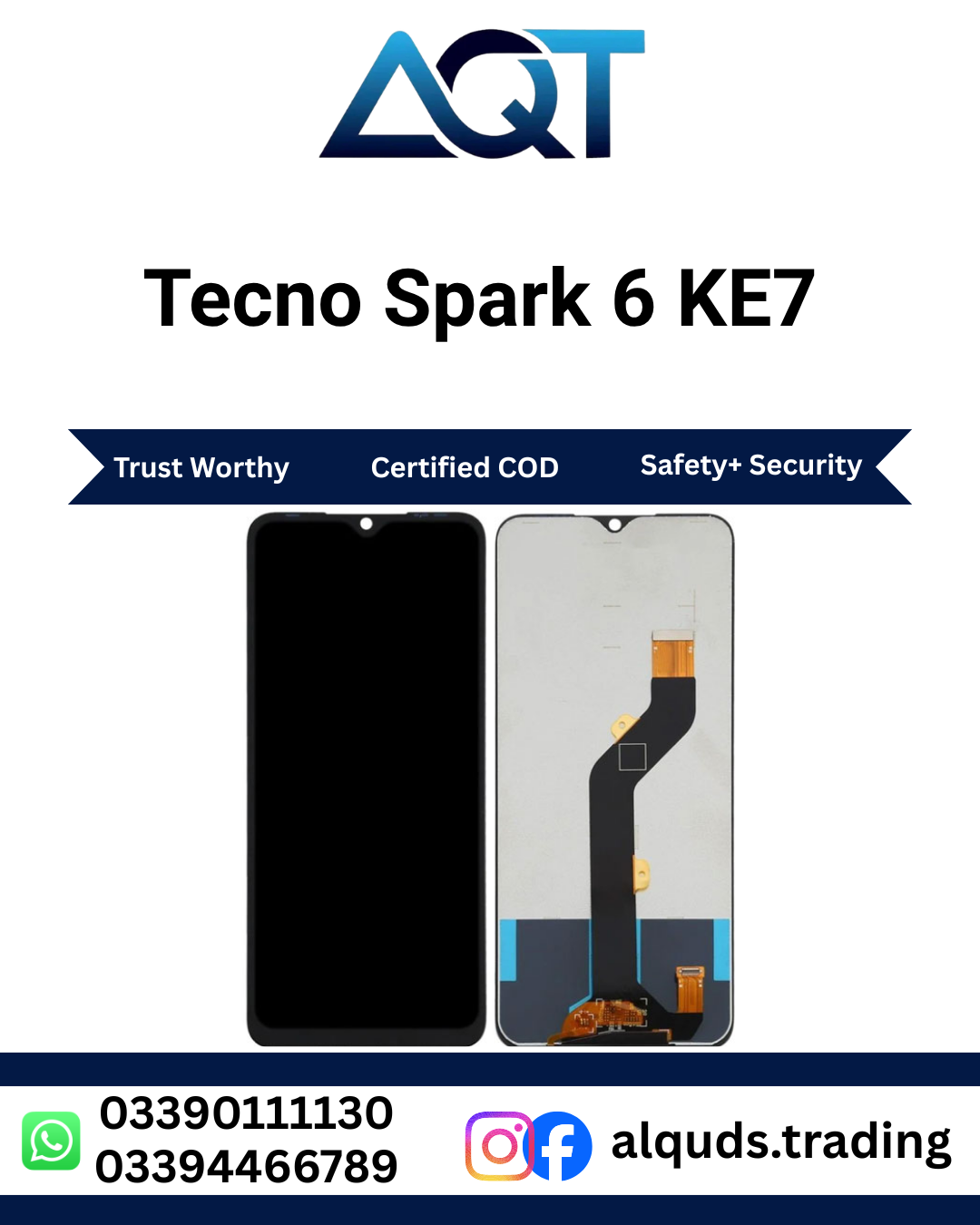

Tecno Spark 6 KE7 LCD Panel – Best Quality Display
If the screen of your phone is broken, cracked, showing lines, or not displaying properly, the Tecno Spark 6 KE7 LCD Panel can help restore normal display use. A damaged screen can make it difficult to read messages, watch videos, use apps, or operate the phone comfortably. Choosing a compatible Tecno Spark 6 KE7 LCD Panel is important for a suitable fit and dependable everyday performance.
At AQT Mobile Parts, we supply mobile phone parts for repair shops, technicians, retailers, and individual customers. You can explore our mobile parts collection at AQT Mobile Parts and contact our team if you need help confirming compatibility before ordering.
Why Choose a Tecno Spark 6 KE7 LCD Panel?
The display is one of the most important parts of a smartphone because you use it for almost every task. A suitable Tecno Spark 6 KE7 LCD Panel can be a practical option when the original screen is damaged or no longer working correctly. It is important to select the right panel for the exact handset model rather than choosing a screen only because it looks similar.
This listing is described as best quality. Actual results can depend on the panel grade, installation quality, phone condition, and handling. Check the product details and warranty or checking terms with the seller before installation, especially if you are buying for a customer or repair business.
Common Signs That Your Phone Screen Needs Attention
A screen may need replacement when it has visible cracks, black patches, coloured lines, flickering, unusual brightness, or areas that no longer show an image. In some cases, the touch function may also stop responding. However, not every display problem is caused by the LCD itself. A loose connector, damaged flex, battery issue, or motherboard fault can create similar symptoms.
- Cracked glass: The screen surface is broken or sharp to touch.
- Lines or spots: Vertical lines, dark patches, or uneven colours appear on the display.
- No image: The phone may turn on or vibrate while the screen remains black.
- Flickering: The picture flashes or changes brightness unexpectedly.
- Touch problems: Some areas do not respond or the screen registers unwanted touches.
Before buying a Tecno Spark 6 KE7 LCD Panel, ask a qualified technician to inspect the phone if the cause of the problem is uncertain.
Confirm Compatibility Before Ordering
Model compatibility is essential when buying mobile phone displays. Please confirm that your handset is the Tecno Spark 6 with model code KE7. Phone names can be similar across different versions, and panels that look alike may have different connectors, dimensions, or specifications.
Check the model number in the phone settings if the display still works. If the phone cannot be opened in settings, check the box, purchase documents, or have a technician identify the model. Do not rely only on the phone’s appearance. Confirm the connector and panel version with the seller before fitting the Tecno Spark 6 KE7 LCD Panel.
Benefits of Replacing a Damaged Display
A compatible Tecno Spark 6 KE7 LCD Panel can make a damaged phone easier to use again. It may restore a clear viewing area and normal interaction when the fault is caused by the display and the replacement is fitted correctly. It can also help repair shops complete customer repairs without requiring the customer to change the entire phone.
- Helps address display damage caused by cracks or impact.
- Can restore image visibility when the old LCD is faulty.
- Offers a repair option for a phone that is otherwise useful.
- Can support routine repair work for technicians and mobile shops.
- Provides a model-specific part when KE7 compatibility is confirmed.
Performance and appearance can vary according to the selected quality grade and installation. For this reason, test the Tecno Spark 6 KE7 LCD Panel before final assembly and confirm that it meets your expectations.
Important Checks Before Installation
Handle a new display carefully. LCD panels are delicate components, and bending, twisting, pressure, or dropping them may cause damage. A trained technician should carry out the installation using suitable tools and safe repair procedures.
- Confirm the handset model and the panel’s compatibility.
- Inspect the package and display for visible damage before fitting.
- Disconnect the phone’s power source and battery where the device design permits, following safe repair procedures.
- Connect the panel carefully without forcing the connector.
- Test the image, brightness, colours, and touch response before sealing the phone.
- Check that the frame and adhesive are properly prepared before final assembly.
Avoid pressing hard on the display or using excessive heat. Incorrect installation can damage the screen, connector, or other phone components. If you are not experienced with mobile repairs, use a professional technician.
Testing the Tecno Spark 6 KE7 LCD Panel
Testing the Tecno Spark 6 KE7 LCD Panel before final installation can help identify problems early. Once connected safely, check whether the screen displays an image across the full area. Review brightness, colour appearance, and any lines, spots, or flickering. Test touch response across different areas if the panel includes touch functionality.
Also check the connector and flex cable for correct seating. If the display remains black, do not repeatedly force the connection or assume the new panel is faulty. The phone may have a damaged connector, board-level fault, or another issue that requires diagnosis.
For repair businesses, testing the Tecno Spark 6 KE7 LCD Panel before applying adhesive can reduce avoidable rework. Follow the supplier’s checking policy and keep packaging and proof of purchase until the part has been checked.
Care Tips After Screen Installation
After installing the Tecno Spark 6 KE7 LCD Panel, avoid dropping the phone or placing heavy objects on it. A protective case and suitable screen protector may help reduce the risk of future damage, although no accessory can guarantee that a display will not break. Keep the handset away from liquids and excessive heat, and do not press hard on areas of the screen.
If lines, flickering, black spots, or touch issues appear after fitting, stop applying pressure and arrange an inspection. A technician can check the connector, frame pressure, installation, and other possible causes.
Buying from AQT Mobile Parts in Lahore, Pakistan
AQT Mobile Parts serves customers looking for mobile phone parts for repairs, retail purchases, and wholesale requirements. We are based at Hall Road Centre, Lahore, a well-known market for mobile phone parts and repair supplies. Customers can contact the team to confirm availability, quality details, compatibility, and applicable checking or warranty terms before placing an order.
Whether you are a repair technician, a mobile shop owner, or an individual customer, make sure you confirm the exact model before purchasing a Tecno Spark 6 KE7 LCD Panel. For orders from Lahore to all Pakistan, ask the team about current stock, delivery arrangements, payment options, and any applicable conditions. Availability and delivery timing may vary.
Who Can Buy This LCD Panel?
The Tecno Spark 6 KE7 LCD Panel may suit mobile repair technicians, phone parts retailers, wholesale buyers, and customers arranging a screen repair. Repair professionals should verify the model and test the panel before completing the job. Retail customers who are unfamiliar with phone repairs should consult a technician to avoid accidental damage during installation.
If you are purchasing a Tecno Spark 6 KE7 LCD Panel for resale or workshop use, confirm the quantity required and ask about current stock before ordering. Clear communication about the model code and quality grade helps reduce the chance of ordering an incompatible part.
Choosing the Right Part for Your Repair
When comparing display parts, look at the exact model compatibility, the stated quality grade, the seller’s checking policy, and the condition of the phone being repaired. The Tecno Spark 6 KE7 LCD Panel should be selected for the KE7 handset rather than by screen size or appearance alone. If you are unsure whether your phone needs a display, charging component, or board repair, request a diagnosis before buying parts.
For technicians, keeping the work area clean and organising small screws and connectors can help prevent damage during disassembly. Use tools made for phone repair and avoid pulling the flex cable sharply. When testing the Tecno Spark 6 KE7 LCD Panel, support the screen properly and do not leave it hanging from the connector. If the image changes when the cable is moved, stop and inspect the connection rather than continuing to flex it.
Customers should also understand that a replacement display does not repair unrelated faults. Water exposure, a bent frame, a damaged battery, or a faulty mainboard may affect the repair result. A technician can check these conditions and advise whether fitting the Tecno Spark 6 KE7 LCD Panel is the appropriate next step.
Information to Confirm with the Seller
Before placing an order, ask whether the Tecno Spark 6 KE7 LCD Panel is currently available and which quality grade is being supplied. Confirm the price, delivery charges, payment options, and how the part should be checked on arrival. If your repair shop follows a customer-return policy, make sure the supplier’s terms are understood before the panel is installed.
When the package arrives, compare the item with your order and inspect it carefully before use. Keep the invoice and packaging until testing is complete. If there is a concern, contact the seller promptly and follow the stated procedure. These simple steps help both individual buyers and repair businesses manage parts purchases more confidently.
AQT Mobile Parts aims to help customers source mobile repair components with clear product information. Share the exact model code and explain the screen fault when asking about the Tecno Spark 6 KE7 LCD Panel. This makes it easier to confirm whether the listed part matches your repair requirement. For wholesale or repeat orders, confirm stock and pricing each time, as availability may change.
Advice for Everyday Users
After the repair, use the phone normally at first and check that the display remains stable during calls, messaging, browsing, and other everyday tasks. If the screen becomes unusually hot, starts flickering, or stops responding, seek professional inspection. Do not try to correct a display issue by pressing firmly on the glass or bending the handset. A properly checked Tecno Spark 6 KE7 LCD Panel should be installed without putting unnecessary pressure on the connector or display surface.
Keep your repair receipt and note the date of installation. If you need after-sales help, these details can make it easier to explain the issue. Before another repair is started, ask the technician to check the fitting and connector as well as the panel itself. This can help identify whether the problem relates to the Tecno Spark 6 KE7 LCD Panel or another component inside the phone. Ask the technician to check the Tecno Spark 6 KE7 LCD Panel carefully before closing the handset. Correct fitting and a final test help confirm that the Tecno Spark 6 KE7 LCD Panel is working as expected.
For a smooth purchase, give the seller the full model name and code, describe the fault, and ask any questions about quality and checking before ordering. Confirming these details in advance helps you choose the correct Tecno Spark 6 KE7 LCD Panel for the intended repair. Keep the Tecno Spark 6 KE7 LCD Panel protected from pressure until installation, and test the Tecno Spark 6 KE7 LCD Panel before final sealing.
Frequently Asked Questions
Is this LCD Panel compatible with Tecno Spark 6 KE7?
This listing is intended for the Tecno Spark 6 KE7. Confirm the model code on your handset and verify the part details with the seller before installation.
Can I install the panel at home?
Installing a Tecno Spark 6 KE7 LCD Panel requires careful handling and suitable tools. Professional installation is recommended if you do not have experience repairing smartphones.
Will a new panel fix every display problem?
No. A Tecno Spark 6 KE7 LCD Panel may not solve issues caused by a damaged connector, motherboard, power circuit, or other internal component. Diagnosis is recommended when the cause is unclear.
Should I test the display before fitting it completely?
Yes. Where the device and repair procedure allow, test the Tecno Spark 6 KE7 LCD Panel before final sealing. Check image quality, brightness, and touch response, and follow the supplier’s checking policy.
Can I order this part from outside Lahore?
Contact AQT Mobile Parts to confirm current availability, shipping arrangements, payment methods, and delivery details for your location in Pakistan.
Does the product include a warranty?
Warranty and checking terms can vary by product and quality grade. Confirm the applicable terms with AQT Mobile Parts before purchase and installation.
Order the Tecno Spark 6 KE7 LCD Panel
If your Tecno Spark 6 KE7 has a cracked screen, display lines, black patches, or another screen-related fault, first confirm the diagnosis and model compatibility. Contact AQT Mobile Parts to check current stock, quality details, price, delivery options, and applicable terms. Choose the correct Tecno Spark 6 KE7 LCD Panel and have it installed carefully so you can get back to everyday phone use.
For official brand information, visit the official TECNO website.


Reviews
There are no reviews yet.