





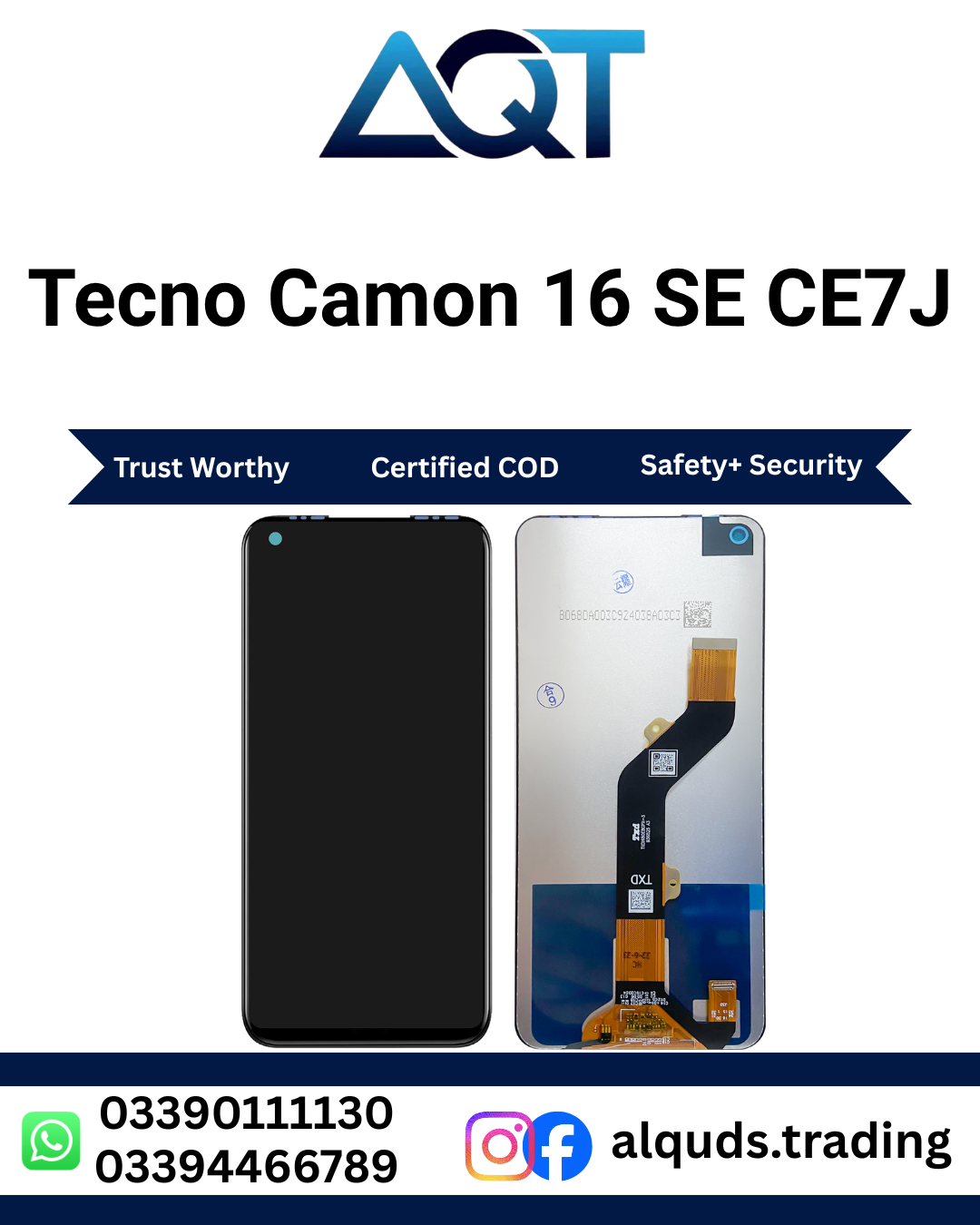

Tecno Camon 16 SE CE7J LCD Panel | Best Quality
The Tecno Camon 16 SE is a smartphone designed for everyday activities such as calling, messaging, watching videos, browsing the internet, and using mobile applications. A working display is important because it allows you to see information and control your phone through touch. If your screen becomes damaged, choosing a compatible display panel is an important step in repairing your device.
The Tecno Camon 16 SE CE7J LCD Panel is intended for customers looking for a display part for the Tecno Camon 16 SE with model code CE7J. Whether you are a mobile repair technician, a mobile shop owner, or an individual customer, checking the model number before buying can help you avoid ordering an incorrect part.
AQT Mobile Parts provides mobile phone parts for retail customers and repair professionals. You can explore our Tecno LCD Panels category to find other display options for compatible Tecno devices.
Before purchasing the Tecno Camon 16 SE CE7J LCD Panel, confirm the available quality, current price, stock status, and compatibility with your phone. These checks help you make a better buying decision.
Why Choose the Correct LCD Panel?
A smartphone display is one of its most important components. You use it to read messages, view photographs, open applications, watch videos, and operate the phone. When the display stops working correctly, normal phone use can become difficult.
Choosing the correct Tecno Camon 16 SE CE7J LCD Panel helps your repair technician identify a suitable part for the intended device. A correctly matched panel can help restore the display functions affected by the original screen damage, provided that the rest of the phone is working properly.
A compatible panel is especially important when the original screen has cracks, black spots, display lines, flickering, or other visible problems. However, not every display issue comes from the LCD itself. A damaged connector, loose flex cable, or motherboard fault can also cause display problems.
For this reason, a technician should inspect the device before replacing any component.
Common Signs of a Damaged Display
You may need to inspect your phone if you notice any of the following problems.
1. Cracked Screen
Accidental drops can cause cracks in the front glass or damage the display underneath. Sometimes the phone continues to show an image despite the visible cracks. In other cases, the display may stop working completely.
If the screen is cracked, ask a technician to check whether the damage affects the LCD, touch function, or other components before selecting a replacement part.
2. Black Spots on the Display
Black areas that remain visible on the screen may indicate internal display damage. These spots can appear after the phone falls or experiences pressure.
A damaged LCD may need replacement, but the technician should first confirm that the problem comes from the display rather than another component.
3. Lines on the Screen
Vertical or horizontal lines can make text, photographs, and videos difficult to view. Lines may result from physical damage, a faulty display connection, or an internal hardware problem.
A compatible Tecno Camon 16 SE CE7J LCD Panel may be suitable if testing confirms that the original display is faulty.
4. Flickering Display
A flickering screen can make your phone uncomfortable to use. Possible causes include display damage, connector problems, software issues, or unstable power supplied to the display.
A technician should diagnose the problem before recommending a new panel.
5. Blank Screen
If your phone powers on but does not show an image, the LCD may be damaged. However, a blank screen can also result from a battery problem, motherboard fault, or other hardware issue.
Proper diagnosis can help prevent unnecessary spending on parts that will not solve the actual problem.
Important Compatibility Information
Before ordering a Tecno Camon 16 SE CE7J LCD Panel, verify the exact phone model. Similar Tecno smartphones can have different display dimensions, connectors, flex cables, and panel specifications.
Check the following details before making your purchase:
- Brand: Tecno
- Phone model: Camon 16 SE
- Model code: CE7J
- Part type: LCD Panel
- Quality: Confirm the available quality with the seller.
- Connector: Check the connector and flex cable against the original part.
- Physical fit: Confirm the dimensions and mounting arrangement.
- Stock and price: Contact AQT Mobile Parts for current information.
Do not order a display based only on the phone’s appearance or a similar model name. The model code and physical specifications are more useful when confirming compatibility.
If you are unsure whether the Tecno Camon 16 SE CE7J LCD Panel is the correct part, share the model information with your repair technician or contact the seller before placing your order.
Benefits of Buying a Suitable Display Panel
Restore Everyday Phone Use
A correctly selected display can help restore visibility when the original LCD is damaged. You may be able to use your phone again for calls, messages, online browsing, and other everyday activities after a successful repair.
The final result depends on the condition of the replacement panel and the phone’s other components.
Improve Screen Visibility
A suitable display should be checked for clear images, consistent brightness, and visible colours. Testing helps identify display defects before the phone is fully assembled.
Do not assume that every panel has identical brightness or colour characteristics. Available quality grades and specifications may vary.
Support Mobile Repair Businesses
Mobile repair shops need suitable spare parts for the devices their customers bring in. A Tecno Camon 16 SE CE7J LCD Panel can be a useful stock item for a repair business when there is customer demand for this model.
Repair professionals should confirm the part specifications, quality, and current supply before ordering multiple units.
Help Avoid Incorrect Purchases
Checking the model code, connector, and panel design before purchasing can reduce the risk of ordering an incompatible display. It also helps technicians plan the repair more efficiently.
Display Quality and Inspection
The words “Best Quality” in a product title describe the intended product listing, but buyers should confirm the actual quality grade and specifications before purchasing. Display parts may differ in manufacturing quality, appearance, performance, and construction.
When discussing the Tecno Camon 16 SE CE7J LCD Panel with a seller, ask which quality option is available and whether the panel has been tested.
A basic inspection should include the following points:
- Check the display for cracks, scratches, and visible damage.
- Look for unusual marks or defects on the panel.
- Inspect the flex cable and connector.
- Confirm that the part matches the original display.
- Test the image before final installation.
- Check touch response if touch functionality is included in the supplied assembly.
- Ask about the seller’s applicable warranty and return conditions.
Testing can help identify problems before the technician completes the repair. It does not guarantee that a component will remain fault-free indefinitely, so proper handling and installation are also important.
Installation Guidance for Technicians
Installing the Tecno Camon 16 SE CE7J LCD Panel should be handled carefully. Smartphone displays and their connectors can be damaged by excessive pressure, incorrect tools, or improper handling.
If you do not have mobile repair experience, it is better to use a qualified technician.
Step 1: Inspect the Phone
The technician should inspect the device and confirm the model code. The phone should also be checked for signs of frame damage, liquid exposure, and other faults that could affect the repair.
Step 2: Power Off the Device
Before opening the phone, the technician should follow the appropriate repair procedure and disconnect the battery when required. This helps reduce the risk of electrical damage during handling.
Step 3: Remove the Damaged Display
The original display should be removed using suitable tools and controlled heat where appropriate. Excessive force can damage the frame, flex cables, or internal components.
Step 4: Check the Replacement Part
Before applying adhesive or completing assembly, compare the new panel with the original part. Verify the connector position, flex cable arrangement, physical dimensions, and model compatibility.
Step 5: Test Before Final Assembly
Connect the replacement display according to the device’s repair procedure. Test the image, brightness, colour appearance, and touch response where applicable.
If the display does not work correctly, disconnect the power and inspect the installation. The problem may involve the connector, panel, or another phone component.
Step 6: Complete the Installation
After successful testing, the technician can finish the assembly using suitable materials and procedures. The display should be seated correctly without unnecessary pressure on the panel or cables.
Customers should ask the repair professional to test the main display functions before accepting the repaired phone.
How to Care for Your Repaired Display
After installing the Tecno Camon 16 SE CE7J LCD Panel, good handling habits can help reduce the risk of physical damage.
Use a suitable protective case and screen protector where compatible. Avoid placing heavy objects on the phone or keeping it in a position where it can bend under pressure.
Keep the phone away from liquids and excessive moisture. Do not press hard on the screen to remove a mark or attempt to repair display problems using sharp tools.
Clean the screen gently with a soft, suitable cloth. Avoid harsh chemicals that may damage the display surface or surrounding materials.
If the screen develops lines, black spots, flickering, or touch problems after installation, contact the technician who completed the repair. Do not open the phone yourself unless you have the required experience and tools.
Buying from AQT Mobile Parts in Lahore
AQT Mobile Parts serves customers looking for mobile phone spare parts, including display panels and other repair components. Customers can contact the business to ask about the Tecno Camon 16 SE CE7J LCD Panel, available quality, current price, and ordering options.
The business is located at Shop No. 15 & 16, 2nd Floor, Centre, Kacha Hall Road, Garhi Shahu, Lahore.
Whether you need one display for a personal phone repair or parts for your repair shop, confirm availability before visiting or placing an order. Prices and stock can change, so it is best to obtain the latest details directly from the seller.
AQT Mobile Parts supports customers looking for mobile parts from Lahore to all Pakistan, subject to the available delivery arrangements. Contact the team to confirm shipping options, estimated delivery, payment arrangements, and any applicable warranty or return terms.
Retail and Wholesale Customers
Individual buyers usually need one suitable part for a phone repair. Repair shops and wholesalers may need several units, consistent quality, or regular access to specific models.
If you are purchasing the Tecno Camon 16 SE CE7J LCD Panel for business use, discuss your required quantity and quality grade with the seller before ordering.
For wholesale enquiries, confirm the price per unit, available quantity, testing arrangements, and applicable return conditions. These details help your business estimate repair costs and manage stock more effectively.
For retail purchases, confirm that the panel matches your phone and understand the terms of sale before completing the transaction.
Frequently Asked Questions
1. Which phone is compatible with the Tecno Camon 16 SE CE7J LCD Panel?
This product is intended for the Tecno Camon 16 SE with model code CE7J. Confirm the model and physical specifications before ordering because similarly named phones may use different display parts.
2. How can I confirm my phone model?
Check the phone’s model information in its settings, on the device label where available, or through a qualified technician. Compare the model code with the product details before buying.
3. Can this panel fix a cracked screen?
It may be suitable when the crack has damaged the display assembly. A technician should inspect the phone to determine which component requires replacement.
4. What if my phone has a black screen?
A damaged LCD is one possible cause, but a battery, connector, or motherboard problem may also prevent the phone from showing an image. Get the device diagnosed before ordering a panel.
5. Will the display work immediately after installation?
A compatible, functional panel should be tested during installation. The result also depends on the condition of the phone, the connector, and the quality of the repair.
6. Is the product available in different quality grades?
Availability can vary. Contact AQT Mobile Parts to confirm which quality options are currently available and how they differ.
7. What is the price of this LCD Panel in Pakistan?
The price may change depending on stock and available quality. Contact AQT Mobile Parts for the current price and delivery details.
8. Can mobile repair shops order this product wholesale?
Repair shops can contact AQT Mobile Parts to ask about quantity availability and wholesale pricing. Confirm the available stock and applicable terms before placing a bulk order.
9. Is professional installation recommended?
Yes, professional installation is recommended if you do not have experience repairing smartphones. Careful handling helps reduce the risk of damage to the display, connectors, and internal components.
10. Does the product include a warranty?
Warranty coverage should be confirmed with the seller before purchasing. Ask about the applicable testing period, coverage, and return conditions rather than assuming that every Tecno Camon 16 SE CE7J LCD Panel has the same warranty.
Order Your Tecno Camon 16 SE CE7J LCD Panel
If your Tecno Camon 16 SE has a damaged display, start by confirming the model code and identifying the actual cause of the problem. Choosing the correct part and having it installed properly can help you avoid unnecessary repair costs.
The Tecno Camon 16 SE CE7J LCD Panel is intended for customers seeking a display part for this specific device. Before ordering, confirm compatibility, available quality, price, and stock with AQT Mobile Parts.
Mobile repair technicians should test the display before completing installation and explain any applicable warranty or return conditions to their customers.
For current availability and ordering information, contact AQT Mobile Parts in Lahore. The team can help you check the available product details and delivery options from Lahore to all Pakistan.
For official brand information, visit the official TECNO website.


Reviews
There are no reviews yet.