





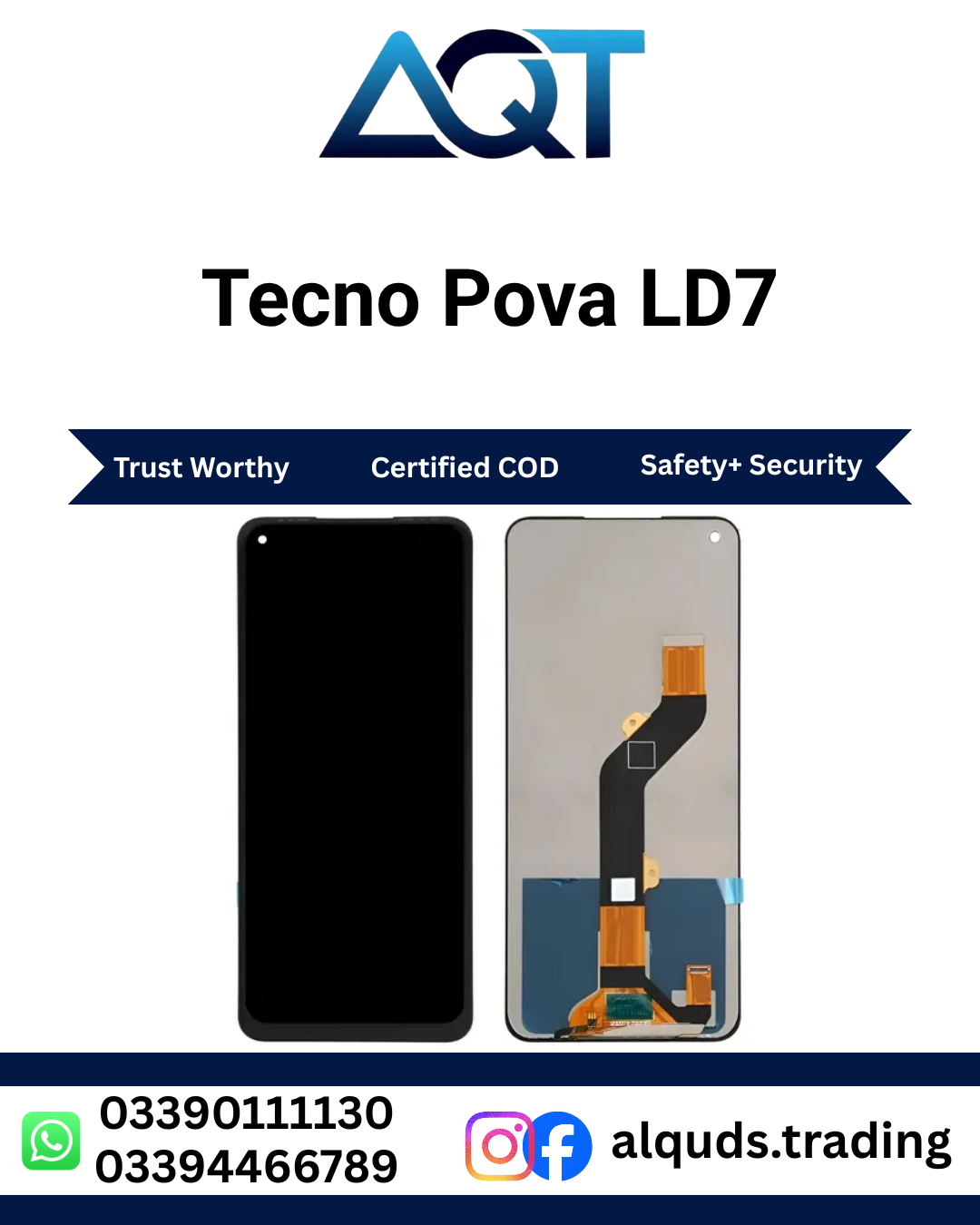

Tecno Pova LD7 LCD Panel | Best Quality
The Tecno Pova LD7 LCD Panel is a display replacement option for customers who need to repair a compatible Tecno Pova smartphone with a cracked screen, damaged display, black screen, flickering, or other display-related problems. A faulty screen can make everyday phone use difficult, from reading messages and making calls to browsing the internet and using applications. Selecting a compatible display panel can help restore the usability of your phone when the original display is no longer working correctly. When checking a Tecno Pova LD7 LCD Panel, make sure the part is intended for the exact device.
At AQT Mobile Parts, we help retail customers, mobile repair technicians, shop owners, and wholesale buyers find mobile spare parts for their repair needs. If you are considering a Tecno Pova LD7 LCD Panel, confirm the exact model code and compatibility before ordering. Similar phone names do not always mean that their display assemblies are interchangeable. Product availability, quality options, and warranty conditions should also be checked with the seller before purchase.
Explore our Tecno mobile panels collection to browse other display options for compatible Tecno devices.
Product Details
- Product name: Tecno Pova LD7 LCD Panel
- Brand: Tecno
- Model code: LD7; verify the code against your phone before ordering
- Product type: Mobile LCD panel
- Listed quality: Best Quality
- Purpose: Display replacement for a compatible device
- Suitable buyers: Repair technicians, retailers, wholesalers, and individual customers
- Availability: Confirm current stock with AQT Mobile Parts
- Installation: Professional installation is recommended
The Tecno Pova LD7 LCD Panel is listed for customers looking for a display part for a compatible handset. The exact specifications, panel construction, frame inclusion, and other package details can vary, so do not assume that accessories or a frame are included unless the seller confirms them. Checking these details before purchase can prevent confusion and help you choose the appropriate part. Ask whether the Tecno Pova LD7 LCD Panel is supplied with the same configuration your repair requires.
Why Choose the Correct Display Panel?
A damaged display can affect the way you use your phone throughout the day. Cracks, dark patches, flickering, and display lines may make information difficult to read or stop you from using some areas of the screen. If the phone is otherwise in good working condition, a suitable replacement may be a practical repair option compared with replacing the entire device.
Choosing a compatible Tecno Pova LD7 LCD Panel helps the repair technician work with a part intended for the identified model. Correct fit and connector compatibility matter just as much as the product’s appearance. A panel that looks similar to the original may still have a different connector, size, or mounting arrangement. This is why the Tecno Pova LD7 LCD Panel should be matched by model and connector, not appearance alone.
Before purchasing, ask the seller to confirm the exact model, the quality grade being supplied, whether the panel includes a frame, and the applicable checking or warranty policy. Product descriptions such as “Best Quality” can be used differently by different sellers, so it is sensible to confirm what the description means for the actual item being offered. Ask what quality option applies to the Tecno Pova LD7 LCD Panel currently in stock.
Common Display Problems
1. Cracked or Broken Screen
A phone may be dropped or struck against a hard surface, causing visible cracks or damage to the display assembly. Even if the phone still turns on, broken glass or a damaged display can make it uncomfortable to use. A technician should inspect the device to determine which parts require repair and whether the replacement is suitable. This assessment can help establish whether the Tecno Pova LD7 LCD Panel is a suitable choice.
2. Black or Blank Display
If the phone vibrates, rings, or otherwise appears to power on but the screen remains black, the display may be damaged. However, a black screen can also result from a loose connector, battery problem, or another internal fault. A diagnosis should be completed before ordering a new panel so that the actual cause is addressed. A technician can then determine whether the Tecno Pova LD7 LCD Panel is the appropriate repair part.
3. Lines, Spots, or Unusual Colours
Vertical lines, horizontal lines, dark patches, or unusual colours can indicate damage to the display or its connection. These symptoms sometimes appear after a drop or after pressure has been applied to the screen. Ask a repair professional to inspect the phone rather than assuming that every visual fault has the same cause. If the panel is confirmed faulty, ask about the Tecno Pova LD7 LCD Panel and its compatibility.
4. Flickering or Partial Display Failure
A display that flickers or shows images only in part of the screen may have a panel or connection problem. Avoid pressing hard on the affected area, as pressure can make damage worse. A technician can check the connector and other hardware before deciding whether a replacement is required. This check helps confirm whether a Tecno Pova LD7 LCD Panel is actually needed.
Check Compatibility Before Ordering
Compatibility is one of the most important steps when buying mobile spare parts. The Tecno Pova LD7 LCD Panel should only be ordered after the model code and part compatibility have been confirmed. Smartphone models can have similar names while using different display components.
- Confirm the model: Check the phone’s model information or ask a technician to identify the exact model code.
- Compare the old part: Where possible, compare the connector, shape, dimensions, and mounting points with the replacement.
- Confirm the supplied version: Ask whether the item is the panel only or includes a frame or other components.
- Check quality details: Confirm what quality grade is available and whether it meets your repair requirements.
- Ask about stock: Product variations and availability can change, so verify current stock before payment.
- Understand the policy: Ask about testing, warranty, and installation-related exclusions before fitting the part.
These checks help reduce the chance of ordering an incompatible component. If you are purchasing for a customer, verify the model with them before confirming the repair cost or delivery time. Confirming the Tecno Pova LD7 LCD Panel details can also help avoid delays caused by ordering the wrong part.
Installation and Testing Guide
Mobile display installation requires suitable tools, careful handling, and knowledge of the device’s internal layout. If you do not have experience repairing smartphones, use a qualified technician. Incorrect disassembly or connection can damage the new panel, battery, connectors, or other internal components. Handle the Tecno Pova LD7 LCD Panel carefully and keep its flex cable free from sharp bends.
1. Inspect the Phone
Check the device for impact damage, a bent frame, liquid exposure, or other visible faults. Confirm the exact model and make sure the selected replacement is intended for that device. Discuss any additional damage with the customer before beginning work.
2. Power Off the Device
Switch off the phone before opening it. Follow appropriate repair precautions and use tools intended for mobile devices. Avoid working hurriedly or applying force where the casing does not release easily. Careful handling protects both the phone and the Tecno Pova LD7 LCD Panel during testing.
3. Open the Device Carefully
Use the correct opening tools and follow a suitable repair procedure. Excessive force can damage the frame, internal flex cables, battery, or other components. Keep screws and small parts organised so they can be returned to their correct positions.
4. Disconnect the Battery
Before handling display connectors, the technician should disconnect the battery according to the device’s repair procedure. This precaution helps reduce the risk of electrical damage while working on internal components.
5. Remove the Damaged Display
Remove the faulty display assembly carefully, taking care not to damage the motherboard, connectors, frame, or nearby parts. Old adhesive may need to be removed before the new component can be fitted properly.
6. Connect and Test the Replacement
Connect the Tecno Pova LD7 LCD Panel and test it before final fitting. Check that the screen displays images correctly and test touch response if the supplied assembly supports touch functionality. Look for visible lines, dark areas, flickering, or other abnormalities. If a problem appears, check the connection and compatibility rather than forcing the panel into place. Keep the Tecno Pova LD7 LCD Panel connected only as directed by the repair procedure.
7. Complete the Repair
After the panel passes testing, complete the fitting using suitable materials and the correct procedure. Ensure that cables are positioned safely and that the display is not bent or placed under unnecessary pressure. Perform a final inspection after assembly.
Care Tips After Display Replacement
Careful handling can reduce some common risks after a screen repair. Use a protective case that fits the phone correctly and consider a compatible screen protector. These accessories may help protect against everyday scratches and minor impacts, but they cannot guarantee that a display will not break. These precautions are useful after fitting a Tecno Pova LD7 LCD Panel as well.
- Avoid dropping the phone or placing heavy objects on it.
- Do not press hard on the display, especially around damaged areas.
- Keep the device away from liquids and excessive moisture.
- Avoid bending the phone or keeping it in a position where it may be compressed.
- Have the phone inspected if lines, flickering, or dark patches appear after repair.
- Do not attempt to push a loose display back into place yourself.
After a phone has been opened for repair, its original resistance to dust or water may be affected. Do not assume that the device remains water-resistant unless its condition and repair specifications have been properly verified.
Buy Tecno Pova LD7 LCD Panel in Pakistan
AQT Mobile Parts supplies mobile spare parts for retail and wholesale customers. If you need a Tecno Pova LD7 LCD Panel for a personal repair or for your repair shop, contact our team to confirm the current price, stock availability, quality options, and warranty conditions. Confirming these details in advance helps you make an informed purchase. Ask for the current Tecno Pova LD7 LCD Panel price before arranging payment.
Our shop is located at Shop No. 15 and 16, second floor, Hall Road Centre, Garhi Shahu, Lahore. Customers can contact us for product information and ordering guidance. We serve mobile repair technicians, resellers, and individual buyers who need mobile parts for compatible devices.
For orders outside Lahore, ask about delivery arrangements from Lahore to all Pakistan. Shipping options, charges, dispatch timing, and estimated delivery depend on the order and destination, so confirm the details with our team before completing your purchase. Include Tecno Pova LD7 LCD Panel in your enquiry so the product can be identified clearly. Wholesale customers can also ask about quantity requirements and pricing for available stock.
Why Contact AQT Mobile Parts?
Finding the right mobile spare part is easier when the product details are checked before purchase. AQT Mobile Parts can help customers confirm the listed model, available quality option, current price, and applicable purchase conditions. We encourage customers to ask questions before ordering, especially when the model code or display version is uncertain. Share the model details when asking about a Tecno Pova LD7 LCD Panel so the team can check the correct version.
When contacting our team, mention the complete product name, Tecno Pova LD7 LCD Panel, and provide the phone’s model information if available. If you are a technician or retailer, include the quantity you need so the team can check availability. Always confirm the exact part and terms before making payment or beginning installation. This is particularly important when buying a Tecno Pova LD7 LCD Panel for a customer’s repair.
Frequently Asked Questions
1. Which phone is this LCD panel for?
This product is listed for Tecno Pova model code LD7. Please verify that LD7 matches your exact phone and confirm compatibility with the seller before ordering. Do not rely on the name alone when selecting a Tecno Pova LD7 LCD Panel.
2. Can a replacement panel fix a cracked screen?
A compatible replacement may resolve display problems caused by a damaged screen. A correctly matched Tecno Pova LD7 LCD Panel can be considered after the fault is diagnosed. If the frame, motherboard, connector, or other components are also damaged, additional repair work may be required.
3. What should I do if my phone has a black screen?
A black screen may be caused by display damage, a loose connector, a power issue, or another hardware fault. Have the phone diagnosed before purchasing a replacement part. This can help establish whether a Tecno Pova LD7 LCD Panel will address the fault.
4. Should the display be tested before installation?
Yes. A technician should connect and test the panel before final fitting, using suitable repair precautions. Testing can help identify compatibility or connection issues early. Confirm the Tecno Pova LD7 LCD Panel works correctly before completing the assembly.
5. Can I install the panel myself?
Professional installation is recommended if you do not have smartphone repair experience. Incorrect handling can damage the replacement panel or other phone components.
6. Is wholesale purchasing available?
Wholesale availability, quantities, and pricing depend on current stock. Contact AQT Mobile Parts to discuss your requirements and confirm the available options. Ask the team whether the Tecno Pova LD7 LCD Panel is available in the quantity you need.
7. Does this product include a warranty?
Warranty coverage and checking conditions depend on the applicable product and store policy. Confirm the terms with AQT Mobile Parts before purchase and installation.
8. Can I order from outside Lahore?
Contact our team to confirm delivery availability, shipping charges, and estimated delivery arrangements for your location in Pakistan.
9. How can I avoid ordering the wrong panel?
Verify the exact phone model, compare the original part where possible, and confirm the connector, frame inclusion, quality description, and return or warranty conditions before ordering.
Order Tecno Pova LD7 LCD Panel Today
If your compatible Tecno Pova smartphone has a damaged or faulty display, the Tecno Pova LD7 LCD Panel may be an option to discuss with your repair technician. Confirm the model code, compatibility, quality description, and stock availability before placing an order.
AQT Mobile Parts welcomes retail customers, mobile repair professionals, and wholesale buyers looking for mobile spare parts at competitive prices. Contact our team for current pricing, product details, warranty information, and delivery arrangements. Ask specifically about the Tecno Pova LD7 LCD Panel to receive relevant product information. Choosing the correct part and having it installed and tested carefully can help make the repair process more straightforward. For a smoother purchase, confirm the Tecno Pova LD7 LCD Panel model, price, and warranty terms first.
For general information about the brand, visit the official TECNO website.



Reviews
There are no reviews yet.