





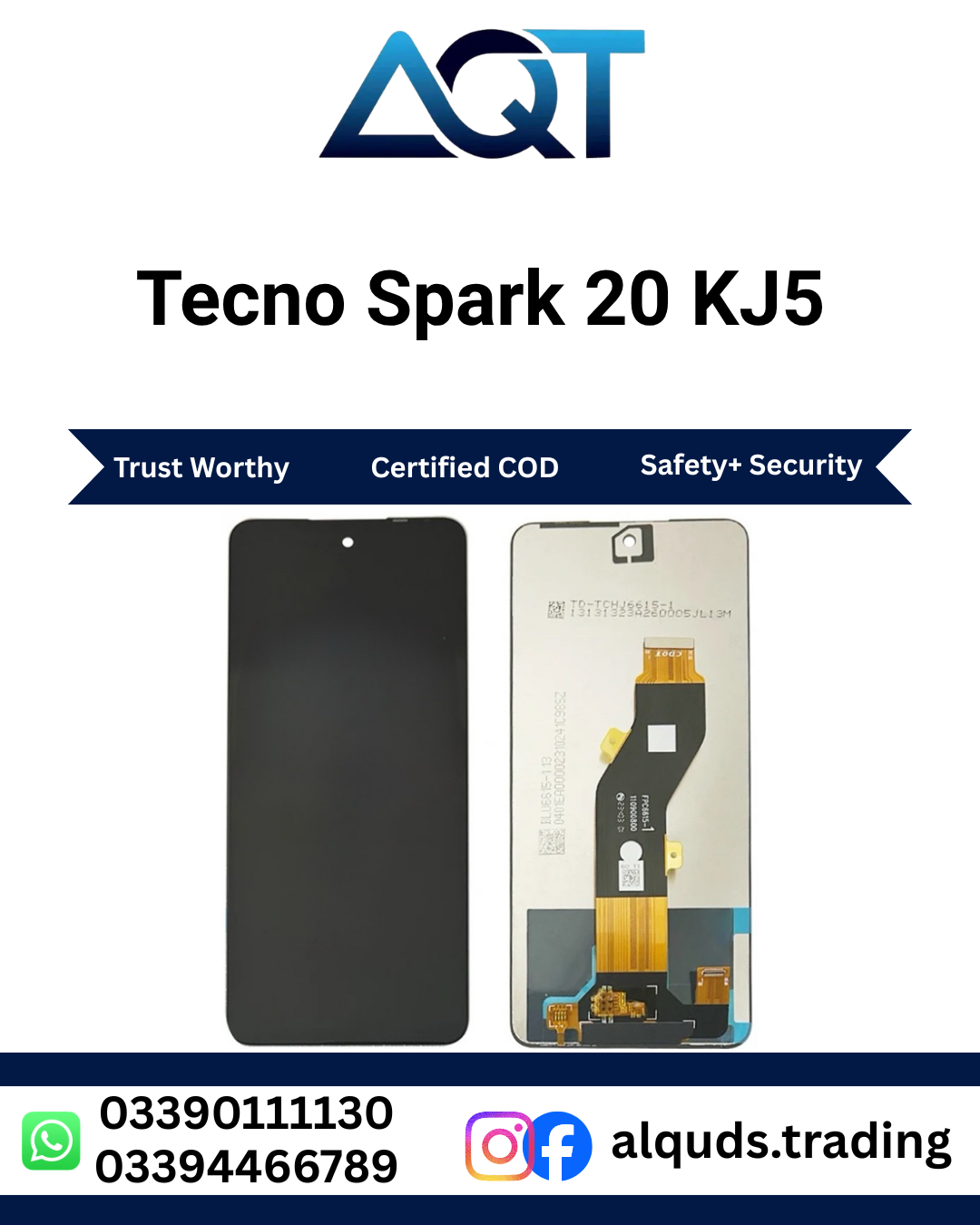

Tecno Spark 20 KJ5 LCD Panel | Best Quality Display
Looking for a reliable Tecno Spark 20 LCD Panel for your mobile repair? AQT Mobile Parts provides mobile display panels and spare parts for repair technicians, retailers, wholesalers, and individual customers. If your Tecno Spark 20 has a cracked screen, display lines, touch problems, or a blank display, selecting a compatible Tecno Spark 20 KJ5 LCD Panel is an important step toward completing the repair.
Visit AQT Mobile Parts to explore mobile spare parts and check current product availability. Before ordering, confirm the handset model code, connector layout, panel quality, and stock with our team.
The Tecno Spark 20 KJ5 LCD Panel is intended for compatible devices identified by the KJ5 model code. Always compare the original display with the supplied component because panels can look similar while having different connectors, dimensions, or assembly designs.
What Is the Tecno Spark 20 KJ5 LCD Panel?
The Tecno Spark 20 KJ5 LCD Panel is a display component used to show images, text, videos, applications, and other visual content on a compatible phone. Depending on the part supplied, the display assembly may include the LCD and touch-sensitive layer, while other components may need to be transferred from the original device.
When the original Tecno Spark 20 KJ5 LCD Panel becomes cracked, develops lines, loses image output, or stops responding properly to touch, a compatible display assembly may be required. However, not every display problem means the LCD itself is faulty. Loose connectors, damaged flex cables, software issues, or a mainboard fault can cause similar symptoms.
For this reason, a technician should inspect the phone before replacing the display. Correct diagnosis helps customers choose the appropriate component and avoid unnecessary repair costs.
Why Choose a Compatible Tecno Spark 20 LCD Panel?
Clear Visual Output
A suitable Tecno Spark 20 KJ5 LCD Panel helps restore the phone’s ability to show readable text, images, menus, and videos when the original display is damaged. The final result depends on the quality of the supplied panel, compatibility, and correct installation.
Responsive Touch Operation
If the supplied assembly includes the touch layer, a compatible replacement may restore touch operation when the original touch component is defective. After installation, the technician should test the entire screen for missed touches, delayed responses, and unwanted inputs.
Suitable for Mobile Repair Work
The Tecno Spark 20 KJ5 LCD Panel can be considered when a technician has confirmed that the compatible display assembly needs replacement. Checking the connector and physical design before fitting the panel helps reduce compatibility issues.
Retail and Wholesale Purchasing
AQT Mobile Parts serves individual customers and businesses looking for mobile spare parts. Repair shops and wholesalers can contact the team to check available quantities, quality grades, pricing, and delivery arrangements before placing an order.
Common Signs of a Damaged Tecno Spark 20 Display
1. Cracked Screen Glass
Accidental drops and impacts can crack the screen. Sometimes the phone continues to display content despite broken glass, but further pressure may worsen the damage. Avoid pressing damaged areas and arrange a proper inspection.
2. Black Screen
If the phone powers on but the display remains black, the LCD assembly or its connection may be damaged. A faulty battery, display connector, or mainboard can also cause a blank screen. Diagnosis is important before ordering a Tecno Spark 20 KJ5 LCD Panel.
3. Vertical or Horizontal Lines
Lines across the screen can indicate display damage, a connector issue, or another hardware fault. If the lines remain after restarting the device, have the phone checked by a qualified technician.
4. Flickering Display
A flickering screen may be caused by a damaged panel, an unstable connection, or a software-related problem. Check the device carefully before deciding whether the display needs replacement.
5. Touchscreen Problems
If certain areas do not respond to touch, typing becomes difficult, or the screen registers unwanted touches, the touch layer or its connection may be faulty. Test the full display area during diagnosis.
6. Unusual Colours or Dark Patches
Discoloured areas, unusual brightness, or dark patches may indicate internal screen damage. A technician should compare the symptoms with other possible hardware faults before replacing the display.
How to Confirm Tecno Spark 20 KJ5 LCD Panel Compatibility
Correct compatibility is essential when purchasing a Tecno Spark 20 KJ5 LCD Panel. The phone’s marketing name alone may not be enough to identify the right component, so verify the model code and physical design before ordering.
- Confirm the model code: Check that the handset is identified as Tecno Spark 20 KJ5.
- Compare the original panel: Check the dimensions, connector position, flex cable, and assembly design.
- Inspect the connector: Ensure the connector shape and contact arrangement match the original component.
- Confirm the supplied assembly: Ask whether the product includes the touch layer or frame, if applicable.
- Verify the quality grade: Confirm whether the available panel is original, OEM-labelled, or aftermarket-compatible.
- Ask before purchasing: Share clear photographs of the original display and its connector if you are unsure about compatibility.
Never force a connector into place or attempt to fit a Tecno Spark 20 KJ5 LCD Panel that does not match the original assembly. An incompatible part can cause further damage or fail to work correctly.
Important Checks Before Installing the LCD Panel
Testing the replacement component before final assembly helps identify problems while the phone is still accessible. Use suitable tools and follow a model-appropriate repair procedure.
Inspect the Panel
Check the new Tecno Spark 20 KJ5 LCD Panel for cracks, damaged flex cables, bent connectors, or other visible defects. If damage is present when the part arrives, document it and contact the supplier before installation.
Check the Image
After connecting the compatible display according to the appropriate repair procedure, power on the phone and inspect the image. Look for lines, flickering, unusual colours, dark spots, and inconsistent brightness.
Test Touch Response
Test the screen from edge to edge. Check typing, scrolling, tapping, and other common gestures. A properly functioning assembly should respond consistently across its usable touch area.
Check the Fit
Confirm that the display sits correctly in the intended position. Incorrect fitting, trapped cables, excess adhesive, or uneven pressure can damage the panel or affect the final result.
Professional Installation of Tecno Spark 20 KJ5 LCD Panel
Replacing a mobile display requires careful handling of internal components. If you do not have mobile repair experience, professional installation is recommended.
Step 1: Diagnose the Display Problem
Check whether the fault is related to the display, connector, battery, or mainboard. Do not assume that a black screen or touch issue always means the LCD panel needs replacement.
Step 2: Power Off the Phone
Switch off the device and follow the correct disassembly procedure. The battery should be disconnected according to safe repair practice before handling internal display connectors.
Step 3: Remove the Damaged Assembly
Use appropriate tools to open the phone. Avoid excessive force, unsafe heating, and pressure on the battery or other components. Carefully disconnect the display flex cable.
Step 4: Compare the Replacement
Before fitting the new Tecno Spark 20 KJ5 LCD Panel, compare its physical dimensions and connector layout with the original component. Stop if the part does not match.
Step 5: Test Before Final Assembly
Connect the replacement display using the appropriate procedure and check image output, touch response, and visible defects. Complete the installation only after the initial tests are satisfactory.
Step 6: Complete the Repair
Secure the compatible display according to the proper repair method. Ensure that no flex cables are trapped and that the assembly is seated correctly. Conduct a final functional check after reassembly.
Tips to Protect Your Tecno Spark 20 Display
- Use a suitable protective case to reduce the risk of damage from accidental drops.
- Choose a compatible screen protector for everyday scratch protection.
- Avoid placing heavy objects on the phone or storing it where it may bend.
- Keep the device away from liquids and excessive moisture.
- Do not press hard on cracked glass or damaged display areas.
- Arrange professional inspection if lines, flickering, or touch problems appear.
- Avoid excessive heat and rough handling during everyday use.
Protective accessories can help reduce everyday wear, but they cannot guarantee that a screen will survive every impact.
Why Buy Tecno Spark 20 KJ5 LCD Panel from AQT Mobile Parts?
AQT Mobile Parts supplies mobile spare parts for technicians, retailers, wholesalers, and individual customers. Our product listings help customers identify the components they need and confirm availability before purchasing.
Support for Repair Professionals
Repair shops need suitable parts to complete repairs efficiently. Checking the model code, connector design, physical fit, and quality grade before installation helps reduce unnecessary delays and repeat work.
Retail and Wholesale Options
Whether you need one display for a customer repair or several panels for your shop, contact AQT Mobile Parts to ask about current stock and wholesale purchasing options. Prices and available quantities may vary with supplier stock.
Confirm Quality Before Ordering
Display panels can be offered in different quality grades. Do not assume that a panel is original simply because it fits the phone or looks similar to the factory display. Ask the supplier to confirm the actual grade, applicable warranty, and return conditions before purchasing.
Delivery from Lahore to All Pakistan
AQT Mobile Parts serves customers from Lahore to all Pakistan. Before confirming your order, ask about shipping charges, delivery coverage, payment options, dispatch time, and current availability.
Frequently Asked Questions
1. Which model is this LCD panel for?
This listing is intended for the Tecno Spark 20 identified by model code KJ5. Confirm the code and compare the original connector before ordering.
2. When should I replace my Tecno Spark 20 LCD Panel?
Replacement may be required when the display is cracked, shows persistent lines, has a blank image, or has confirmed display-related faults. A technician should diagnose the issue first.
3. Will a new Tecno Spark 20 KJ5 LCD Panel fix every screen problem?
No. Connector damage, mainboard faults, and other hardware or software problems can cause similar symptoms. Diagnosis is important before replacing the display.
4. How can I check Tecno Spark 20 KJ5 LCD Panel compatibility?
Confirm the KJ5 model code, connector layout, flex cable, and physical dimensions. If uncertain, share photographs of the original component with the supplier.
5. Is the Tecno Spark 20 KJ5 LCD Panel original?
Originality depends on the actual stock supplied. Contact AQT Mobile Parts to confirm whether the available panel is genuine original, OEM-labelled, or aftermarket-compatible.
6. Can I install Tecno Spark 20 KJ5 LCD Panel myself?
Professional installation is recommended if you do not have the necessary tools and mobile repair experience. Incorrect handling can damage the display or internal components.
7. Is this Tecno Spark 20 KJ5 LCD Panel available for wholesale?
Contact AQT Mobile Parts to confirm current stock, available quantities, quality grades, and wholesale pricing.
8. Can I order Tecno Spark 20 KJ5 LCD Panel from anywhere in Pakistan?
AQT Mobile Parts serves customers from Lahore to all Pakistan. Confirm shipping coverage, charges, and estimated delivery time before placing your order.
Order Tecno Spark 20 KJ5 LCD Panel Today
If your Tecno Spark 20 has a damaged or faulty screen, contact AQT Mobile Parts to check the compatible KJ5 LCD panel and current availability. Confirm the exact model, connector layout, quality grade, and supplied assembly before ordering.
For individual customers, repair technicians, and wholesale buyers, choosing the correct panel and testing it before final installation can help support a dependable repair. Ask about pricing, stock, delivery, and applicable warranty or return conditions before confirming your purchase.
For official product information, visit the official TECNO website.


Reviews
There are no reviews yet.