





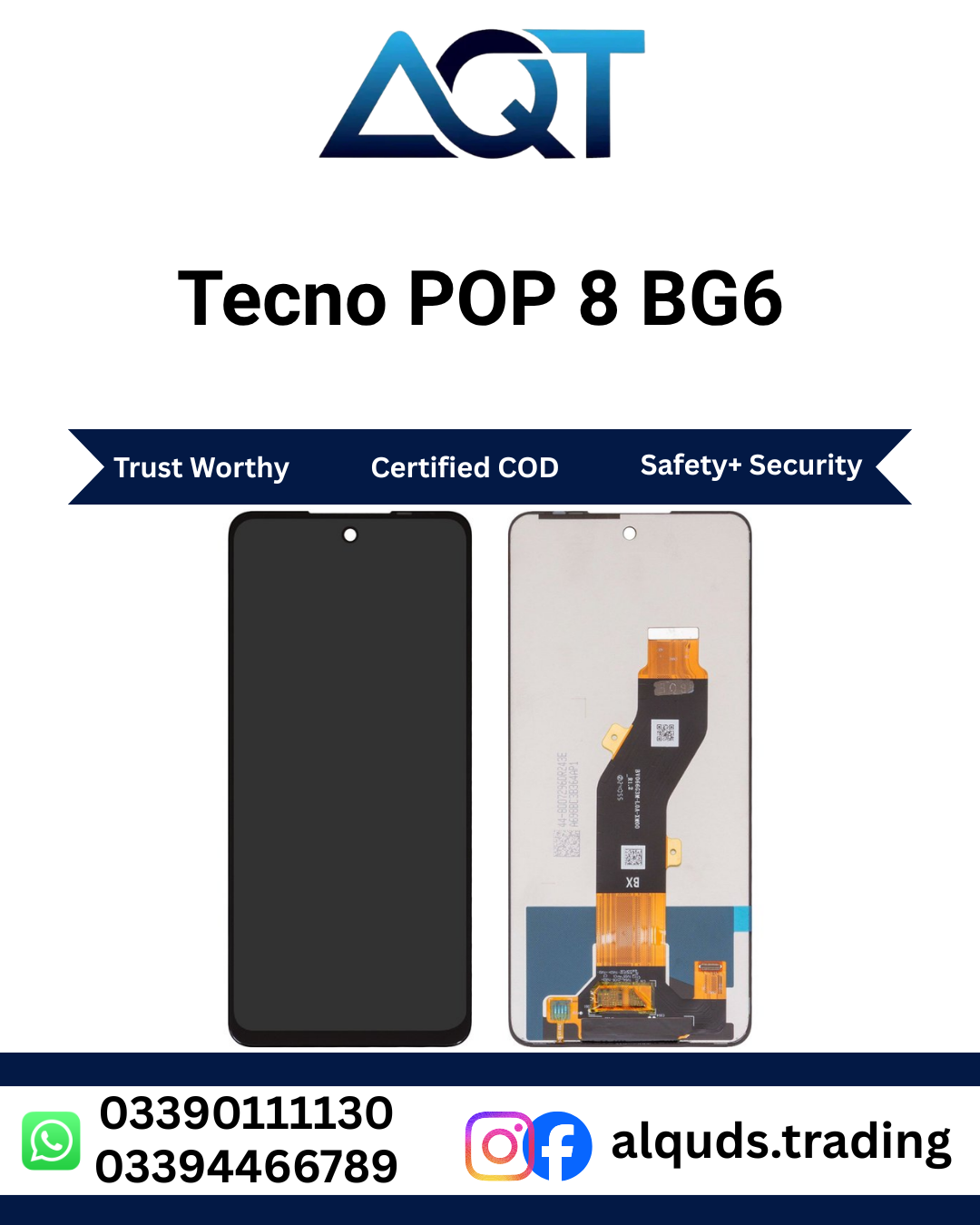

Tecno POP 8 BG6 LCD Panel | Best Quality
Looking for a reliable Tecno POP 8 BG6 LCD Panel for your mobile phone repair? AQT Mobile Parts offers mobile display parts for retail customers, mobile repair technicians, and wholesale buyers. Whether your phone has a cracked screen, damaged display, black screen, or touch-related problem, choosing the correct panel is an important step toward restoring normal phone use.
At AQT Mobile Parts, we understand that customers need the right model, suitable panel quality, and dependable service. Before ordering a Tecno POP 8 BG6 LCD Panel, confirm your phone’s model number and check the product’s available quality options. Visit our AQT Mobile Parts online store to explore mobile panels and other smartphone spare parts.
Tecno POP 8 BG6 LCD Panel – Product Overview
The Tecno POP 8 is an entry-level smartphone designed for everyday activities such as calling, messaging, browsing, online learning, social media, and video viewing. Its display is an important part of the user experience because it allows you to see information and interact with applications through touch.
A damaged screen can make even simple tasks difficult. A compatible Tecno POP 8 BG6 LCD Panel can help address display problems when the original screen is cracked, broken, showing lines, or no longer displaying images correctly. The correct part must match your device’s model and display assembly.
This product listing is intended for customers searching for a Tecno POP 8 display panel associated with the BG6 model code. Please verify the exact model printed in your phone settings or shown on its original packaging before placing an order. Similar phone names do not automatically mean that their display parts are interchangeable.
Why Choose a Compatible Tecno POP 8 BG6 LCD Panel?
Choosing the right display is important for a successful mobile phone repair. A suitable Tecno POP 8 BG6 LCD Panel should fit the intended device and support the functions expected from its display assembly. Compatibility, condition, and product quality should always be considered before purchasing.
Clear Everyday Display
A properly functioning screen allows you to read messages, browse websites, view photographs, watch videos, and use your favourite applications. When selecting a Tecno POP 8 screen, check the advertised specifications and confirm that the panel is suitable for your particular handset.
Touchscreen Functionality
Many display assemblies include the touch-sensitive layer alongside the LCD. If your phone has stopped responding to touch or only responds in certain areas, the screen assembly may need inspection. However, touch problems can also result from connector damage, motherboard faults, moisture, or software issues. A technician should diagnose the problem before installing a new part.
Suitable for Repair Work
A compatible Tecno POP 8 BG6 LCD Panel can be considered when the existing display is physically damaged or has developed a confirmed display fault. Repair technicians should inspect the replacement part before fitting it and test the display functions while the assembly is still accessible.
Retail and Wholesale Availability
AQT Mobile Parts serves individual customers, repair professionals, and mobile spare-parts businesses. Whether you need a single screen for a repair or several panels for your shop, confirm current stock, quality grade, pricing, and applicable warranty conditions before ordering.
Tecno POP 8 Display Specifications
TECNO’s published POP 8 specifications list a 6.6-inch HD+ display with a resolution of 720 × 1612 pixels. These specifications help customers understand the phone’s display category, but they should not be used as the only compatibility test for a replacement component.
- Brand: TECNO
- Phone model: TECNO POP 8
- Model code in this listing: BG6
- Display type: LCD
- Published screen size: 6.6 inches
- Published resolution: 720 × 1612 pixels
- Part category: Mobile LCD display panel
- Installation: Professional installation recommended
These are phone specifications, not a guarantee that every panel advertised for a related model will fit. Before buying a Tecno POP 8 BG6 LCD Panel, compare the actual model code, flex cable, connector position, and assembly details with the part required for your phone.
Signs Your Tecno POP 8 Screen May Need Repair
A damaged display can show several symptoms. Identifying the problem helps you explain the fault to a repair technician and avoid ordering an unnecessary component.
1. Cracked or Broken Glass
If the front glass has visible cracks after a fall or impact, inspect the display carefully. The LCD may still show an image, but cracks can spread and interfere with safe use. Avoid pressing hard on damaged areas, as this may worsen the damage.
2. Black Screen
A phone that powers on without showing an image may have a damaged display, a loose connector, a battery problem, or another internal fault. A technician should check whether the phone is operating before concluding that the LCD is defective.
3. Lines or Unusual Colours
Vertical lines, horizontal lines, flickering, dark patches, or abnormal colours can indicate display damage. These symptoms may occur after an impact or pressure on the screen. A professional inspection can help determine whether the panel or another component is responsible.
4. Touch Not Responding
If the screen displays an image but does not respond correctly to touch, the touch layer or its connection may be damaged. Software issues can also affect responsiveness. Test the phone and have the fault diagnosed before purchasing a replacement assembly.
5. Partial Display Failure
Some screens display content only in part of the viewing area. Dark patches, missing sections, or intermittent images may become more noticeable over time. A compatible Tecno POP 8 BG6 LCD Panel may be appropriate once a technician confirms that the display assembly is faulty.
How to Check the Correct Model Before Ordering
Correct model identification is essential when purchasing mobile phone spare parts. A phone’s marketing name, model code, and display part number are not always identical. Taking a few minutes to confirm these details can help prevent incorrect orders and repair delays.
- Open your phone’s Settings menu.
- Find About Phone or the device information section.
- Check the model number displayed by the phone.
- Compare that information with the product listing and your technician’s requirements.
- If the phone cannot switch on, check its original box or available device identification label.
- Ask the seller to confirm compatibility if the model code is unclear.
Do not order a screen based only on appearance or a similar model name. Related TECNO and other brand phones may share some components, but compatibility should be confirmed for the specific part. If you are unsure whether the Tecno POP 8 BG6 LCD Panel matches your handset, contact AQT Mobile Parts before checkout.
How to Select the Right Panel Quality
Display parts may be offered in different quality grades depending on supplier and availability. Product descriptions can use terms such as compatible, OEM, original, or premium, but these terms should be supported by accurate information about the actual stock.
Check the Actual Quality Grade
Ask which quality option is available and whether the product has been tested. Do not assume that every panel listed for the same phone has identical brightness, colour appearance, touch performance, or durability.
Confirm What Is Included
Some display products include an LCD and touch assembly, while other listings may describe a different configuration. Confirm whether the screen is supplied with a frame or without a frame, and whether additional components are required for installation.
Ask About Warranty Conditions
Before purchasing, confirm the applicable checking period, warranty terms, and any exclusions. Physical damage, liquid exposure, improper fitting, or a torn flex cable may affect warranty eligibility depending on the seller’s policy.
Compare Price and Suitability
The lowest-priced part is not always the most appropriate choice for every repair. Consider the confirmed quality grade, compatibility, testing process, warranty conditions, and intended use when comparing available options for a Tecno POP 8 display.
Installation and Testing Guidelines
Installing a mobile display requires suitable tools, care, and technical experience. Incorrect installation can damage the screen, flex cable, connector, or other internal components. For this reason, professional installation is recommended if you do not have experience repairing smartphones.
Before Installation
- Confirm the exact phone model and compatible part.
- Inspect the panel for visible cracks, marks, or damaged flex cables.
- Keep the work area clean and free from static-producing materials where possible.
- Power off the phone before internal repair work.
- Use appropriate tools and follow safe repair procedures.
Test Before Final Fitting
Where the device design and repair procedure permit, a technician should test the display before applying adhesive or completing final assembly. Check whether the image appears correctly, brightness is usable, and touch input works across the screen. Also inspect for unexpected lines, flickering, dead areas, or intermittent operation.
If the Tecno POP 8 BG6 LCD Panel does not work correctly, disconnect power and inspect the connection and part compatibility. Do not force a connector into place or repeatedly reconnect a damaged flex cable. These actions can cause further damage and complicate the repair.
After Installation
Once the Tecno POP 8 BG6 LCD Panel is fitted, check touch response, screen brightness, colours, and normal operation. Inspect the edges for proper seating and make sure the phone’s buttons and other functions remain accessible. Follow the technician’s advice about adhesive curing time and handling after repair.
How to Maintain Your Phone Screen
After installing a new Tecno POP 8 BG6 LCD Panel, a few simple precautions can help reduce the chance of accidental damage.
- Use a suitable protective case to reduce damage from everyday knocks.
- Consider a compatible screen protector for protection against scratches.
- Avoid placing heavy objects on the phone.
- Keep the device away from liquids and excessive moisture.
- Do not press the screen hard when it stops responding.
- Use a soft, clean cloth to remove fingerprints and dust.
- Arrange a professional inspection if the display begins flickering or showing lines.
These precautions cannot guarantee that a screen will never break, but careful handling can help preserve its condition and reduce avoidable damage.
Buy Tecno POP 8 BG6 LCD Panel in Pakistan
AQT Mobile Parts supplies mobile phone spare parts to customers and repair businesses. If you are looking for a Tecno POP 8 BG6 LCD Panel, confirm the available stock, quality option, price, and compatibility before placing your order.
Our business serves retail and wholesale customers from Lahore to all Pakistan. Customers can enquire about current availability and delivery arrangements before completing a purchase. If you operate a mobile repair shop or spare-parts business, ask about available quantities and wholesale purchasing options.
For customers in Lahore, AQT Mobile Parts is located at Shop No. 15 & 16, 2nd Floor, Centre, Kacha Hall Road, Garhi Shahu, Lahore. Please confirm product availability and applicable order terms before visiting or arranging delivery.
Frequently Asked Questions
Is this panel for the Tecno POP 8 BG6?
This listing is intended for customers searching for the Tecno POP 8 BG6 display. Always confirm your handset’s exact model code and the supplied panel’s compatibility before ordering.
Does the Tecno POP 8 use an LCD or OLED screen?
TECNO’s published specifications identify the POP 8 display as an HD+ screen. This product is listed as an LCD panel. Do not assume an OLED specification unless the actual part has been independently confirmed.
Can I install Tecno POP 8 BG6 LCD Panel myself?
Professional installation is recommended because smartphone display repair involves delicate connectors, adhesive, and internal components. An experienced technician can test the panel and reduce the risk of accidental damage.
Should I replace the screen if the phone has a black display?
Not always. A black screen can be caused by display damage, a connection fault, battery problems, or other hardware issues. Have the phone checked before purchasing a new display.
Can I order this Tecno POP 8 BG6 LCD Panel wholesale?
Retail and wholesale customers can enquire with AQT Mobile Parts about current stock, available quality grades, quantity, and pricing. Wholesale availability and terms should be confirmed before ordering.
How can I confirm the correct Tecno POP 8 BG6 LCD Panel before payment?
Check your phone’s model number and compare it with the product details. If anything is unclear, contact the seller with your model information and ask for compatibility confirmation before payment.
Order from AQT Mobile Parts
Choosing the correct screen is an important part of restoring your phone after display damage. Before ordering a Tecno POP 8 BG6 LCD Panel, verify the model code, confirm the available quality grade, and ask about current stock and warranty terms.
AQT Mobile Parts supports mobile phone users, repair technicians, and wholesale buyers with mobile spare-parts enquiries. Confirm the details of your required panel before checkout to help avoid compatibility problems and unnecessary delays.
For official information about the phone and its published specifications, visit TECNO POP 8 official specifications.



Reviews
There are no reviews yet.