







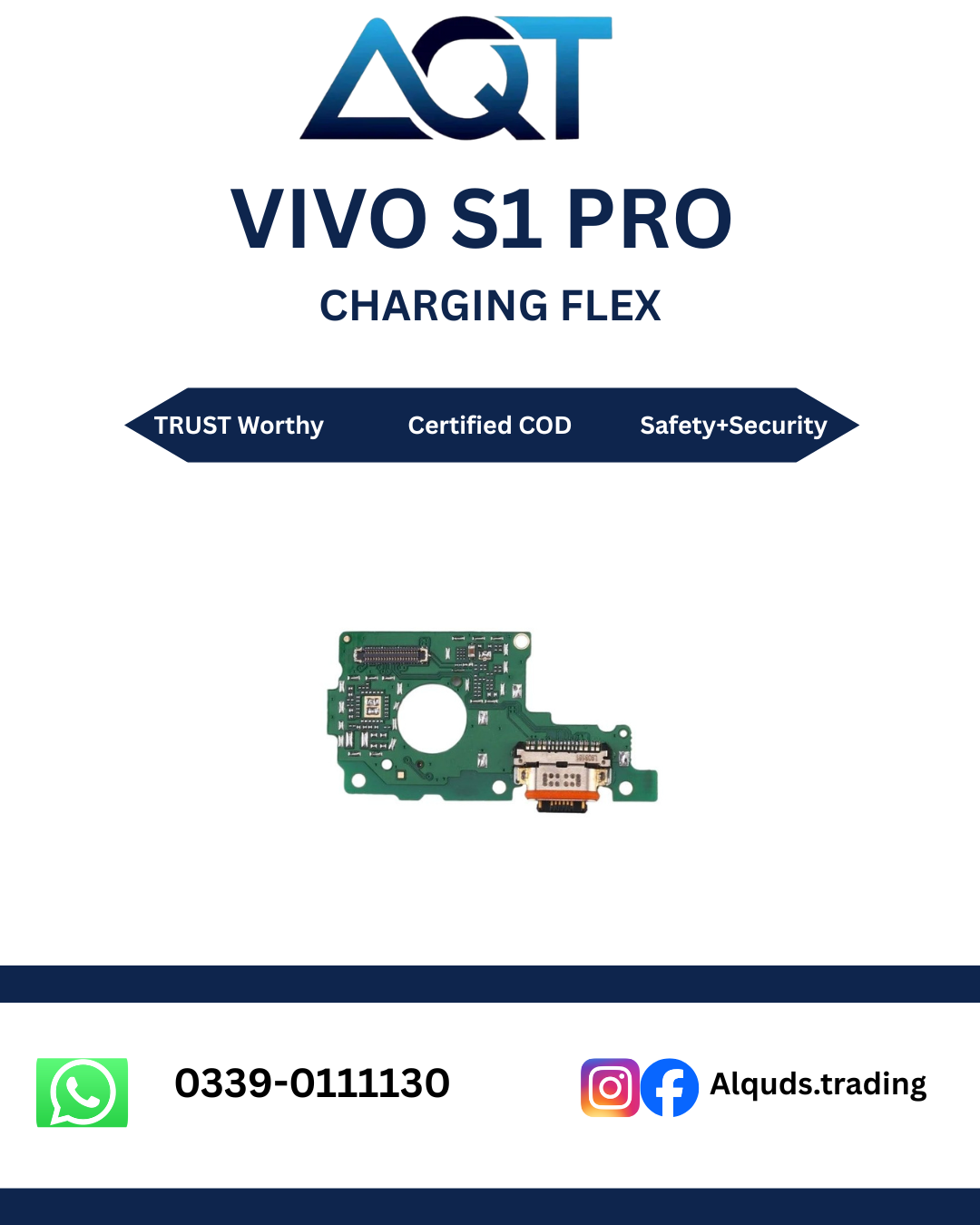

Vivo S1 Pro Charging Flex – Best Quality Mobile Repair Part
Looking for a Vivo S1 Pro Charging Flex for mobile phone repair? AQT Mobile Parts provides mobile spare parts for technicians, repair shops, wholesalers, and individual customers. Choosing the correct charging flex is important when a phone has charging problems caused by a damaged or faulty charging connector assembly.
Before ordering, visit our AQT Mobile Parts online store to explore mobile repair parts and available products. Always confirm the exact device variant and connector design before purchasing a Vivo S1 Pro Charging Flex.
What Is a Vivo S1 Pro Charging Flex?
The Vivo S1 Pro Charging Flex is an internal component used in the phone’s charging connection assembly. Depending on the specific version of the replacement part, it may include a charging connector and a flexible circuit that connects the charging assembly to other phone components.
The charging flex helps establish the electrical connection required for charging. When this component becomes damaged, worn, or disconnected, the phone may experience charging interruptions or other charging-related issues.
A suitable Vivo S1 Pro Charging Flex can help restore charging functionality when a qualified technician identifies the charging flex as the cause of the problem. However, charging faults can also come from the charger, cable, battery, charging circuit, or other internal components.
Why Choose a Quality Vivo S1 Pro Charging Flex?
Choosing a suitable charging flex is important for dependable mobile phone repairs. A compatible part can help a technician complete the repair correctly and reduce problems caused by an unsuitable connector or poorly fitting component.
1. Correct Compatibility
Compatibility should always be the first consideration when purchasing a Vivo S1 Pro Charging Flex. Parts can differ in connector layout, flex shape, component placement, and board connections. Confirm the exact model variant and compare the replacement part with the original component before installation.
2. Reliable Charging Connection
A properly compatible and functional charging flex can provide the connection needed for normal charging when the original flex is faulty. The final result depends on the quality of the part, correct installation, and the condition of the phone’s remaining charging system.
3. Suitable for Repair Professionals
Mobile repair technicians need parts that match the device and can be installed without unnecessary fitting problems. Checking the connector position, flex dimensions, and contact points before installation can help reduce avoidable repair errors.
4. Retail and Wholesale Enquiries
AQT Mobile Parts serves customers looking for mobile spare parts for individual repairs and repair-shop requirements. Contact the store to confirm the current availability, quality grade, and wholesale options for the Vivo S1 Pro Charging Flex.
Common Signs of a Faulty Charging Flex
Charging problems do not always mean the charging flex is defective. The following symptoms may indicate a problem with the charging connector assembly, but proper diagnosis is necessary before replacing any component.
Phone Does Not Charge
If the Vivo S1 Pro does not respond when connected to a charger, inspect the charging cable, adapter, charging port, battery, and charging circuit. If these components are working correctly and the charging flex is found to be faulty, replacing it with a compatible Vivo S1 Pro Charging Flex may resolve the issue.
Charging Starts and Stops
Intermittent charging can occur when the charging connector is damaged, the cable connection is unstable, or the internal charging assembly has a fault. A technician should inspect the port and flex before deciding which component requires repair.
Loose Charging Cable Connection
If the charging cable does not fit securely, the charging port may be worn, damaged, or contaminated with debris. Do not force the cable into the connector. A careful inspection can determine whether cleaning, connector repair, or a compatible charging flex is required.
Slow Charging
Slow charging can have several causes, including an unsuitable charger, damaged cable, battery deterioration, excessive phone temperature, software activity, or an internal charging fault. The charging flex should only be replaced when testing indicates that it is responsible for the problem.
Charging Port Damage
Repeated cable pulling, accidental impact, moisture, or improper handling may damage the charging connector or its internal connections. If the connector assembly is damaged, a technician can inspect the original part and select an appropriate replacement.
How to Confirm the Correct Vivo S1 Pro Charging Flex
Correct identification helps prevent ordering the wrong part. Before purchasing a Vivo S1 Pro Charging Flex, follow these checks.
- Confirm the phone model: Check the device model in the phone settings, on its original packaging, or through a reliable model-identification method.
- Check the exact variant: Do not rely only on the Vivo S1 Pro marketing name if the supplier requires a specific model code.
- Compare the original component: If the phone has already been opened by a technician, compare the connector layout, flex shape, and contact positions.
- Verify the part listing: Ask the supplier to confirm that the part is suitable for the exact device variant.
- Confirm the quality grade: Ask whether the item is original, service-grade, or aftermarket before ordering.
- Check availability: Confirm current stock and applicable warranty or checking terms with the seller.
These checks are particularly useful for repair shops and wholesale buyers who need to avoid compatibility issues and unnecessary returns.
Installation Guidelines for Vivo S1 Pro Charging Flex
Installing a charging flex requires careful handling because the component connects to delicate internal phone circuitry. Professional installation is recommended for customers who do not have mobile phone repair experience.
1. Switch Off the Phone
The phone should be powered off before repair. A technician should follow the appropriate disassembly procedure and disconnect the battery before handling internal connectors.
2. Inspect the Original Assembly
Check the original charging flex for visible damage, corrosion, torn flexible circuits, damaged contacts, or loose connections. The technician should also inspect the charging port and related components for signs of physical damage or moisture.
3. Compare Before Fitting
Place the replacement component beside the original part and compare its overall shape, screw positions, connector layout, and flex routing. Never force a component into position if the connections do not align correctly.
4. Install Carefully
The technician should install the compatible part using suitable tools and the correct disassembly procedure. Avoid bending the flex sharply, pulling its cable, or applying unnecessary pressure to delicate connectors.
5. Test Before Reassembly
After installation, the technician should reconnect the required components safely and test charging functionality before completing the repair. Testing should follow appropriate repair procedures to avoid short circuits or further damage.
Testing After Installation
A replacement should be tested rather than assumed to be working. After installing the Vivo S1 Pro Charging Flex, a technician can check the following points:
- Whether the phone detects a compatible charger.
- Whether the charging connection remains stable.
- Whether charging continues without repeated disconnection.
- Whether the connector fits the cable correctly.
- Whether any unusual heating or other abnormal behaviour occurs.
- Whether the phone’s remaining charging functions operate as expected.
If the phone still does not charge, further diagnosis may be necessary. The battery, charging integrated circuit, motherboard connections, cable, adapter, and other related components may need inspection.
Buying Vivo S1 Pro Charging Flex from AQT Mobile Parts
AQT Mobile Parts supplies mobile spare parts for repair technicians, retailers, wholesalers, and customers who need components for phone repairs. When purchasing a Vivo S1 Pro Charging Flex, confirm the exact model compatibility and quality grade with the store before placing your order.
Our business serves customers looking for mobile repair parts from Lahore to all Pakistan. Contact AQT Mobile Parts to ask about current stock, product details, retail purchasing, wholesale quantities, and applicable checking or warranty conditions.
Before completing your purchase, provide the exact phone model information and, if possible, a clear picture of the original charging flex. This can help the supplier check the required component more accurately.
Care Tips for Your Phone’s Charging Port
Good charging habits may help reduce unnecessary wear on the charging connector and cable.
- Use a compatible charger and a good-quality charging cable.
- Insert and remove the charging cable gently.
- Avoid pulling the cable sideways while it is connected.
- Keep moisture and liquids away from the charging port.
- Do not insert metal objects into the charging connector.
- Ask a technician to inspect the port if the cable becomes loose or charging repeatedly disconnects.
- Avoid charging the phone if the connector becomes unusually hot or shows signs of damage.
Frequently Asked Questions
What does a Vivo S1 Pro Charging Flex do?
The charging flex provides an electrical connection between the phone’s charging connector assembly and the relevant internal circuitry. The exact component design depends on the compatible part version.
How do I know if my Vivo S1 Pro charging flex is faulty?
Charging interruptions, an unstable cable connection, or failure to detect a charger can indicate a charging-related fault. These symptoms can also result from other components, so professional diagnosis is recommended.
Will replacing the charging flex fix every charging problem?
No. It can help when the charging flex is the confirmed cause. A faulty battery, charger, cable, charging circuit, damaged connector, or motherboard issue may require a different repair.
Is the Vivo S1 Pro Charging Flex compatible with every Vivo phone?
No. Charging flexes are model-specific and may vary between devices. Confirm the exact model and part layout before purchasing.
Should I install the charging flex myself?
Professional installation is recommended if you do not have the correct tools and repair experience. Incorrect handling can damage the flex, connectors, battery, or motherboard.
Can I purchase the Vivo S1 Pro Charging Flex wholesale?
Contact AQT Mobile Parts to confirm current stock, available quantities, wholesale pricing, and applicable purchase terms.
Does AQT Mobile Parts deliver across Pakistan?
Contact the store to confirm available delivery services, charges, and estimated delivery times for your city before placing an order.
Order Vivo S1 Pro Charging Flex Today
If your Vivo S1 Pro has a charging issue and a technician has identified the charging flex as faulty, choose a compatible replacement and confirm its quality before purchasing. AQT Mobile Parts can help you check product details and purchasing options for your repair requirements.
Contact AQT Mobile Parts to confirm compatibility, availability, and wholesale or retail purchasing details before ordering your Vivo S1 Pro Charging Flex.
For general device support and troubleshooting, visit the official Vivo website.

Reviews
There are no reviews yet.