





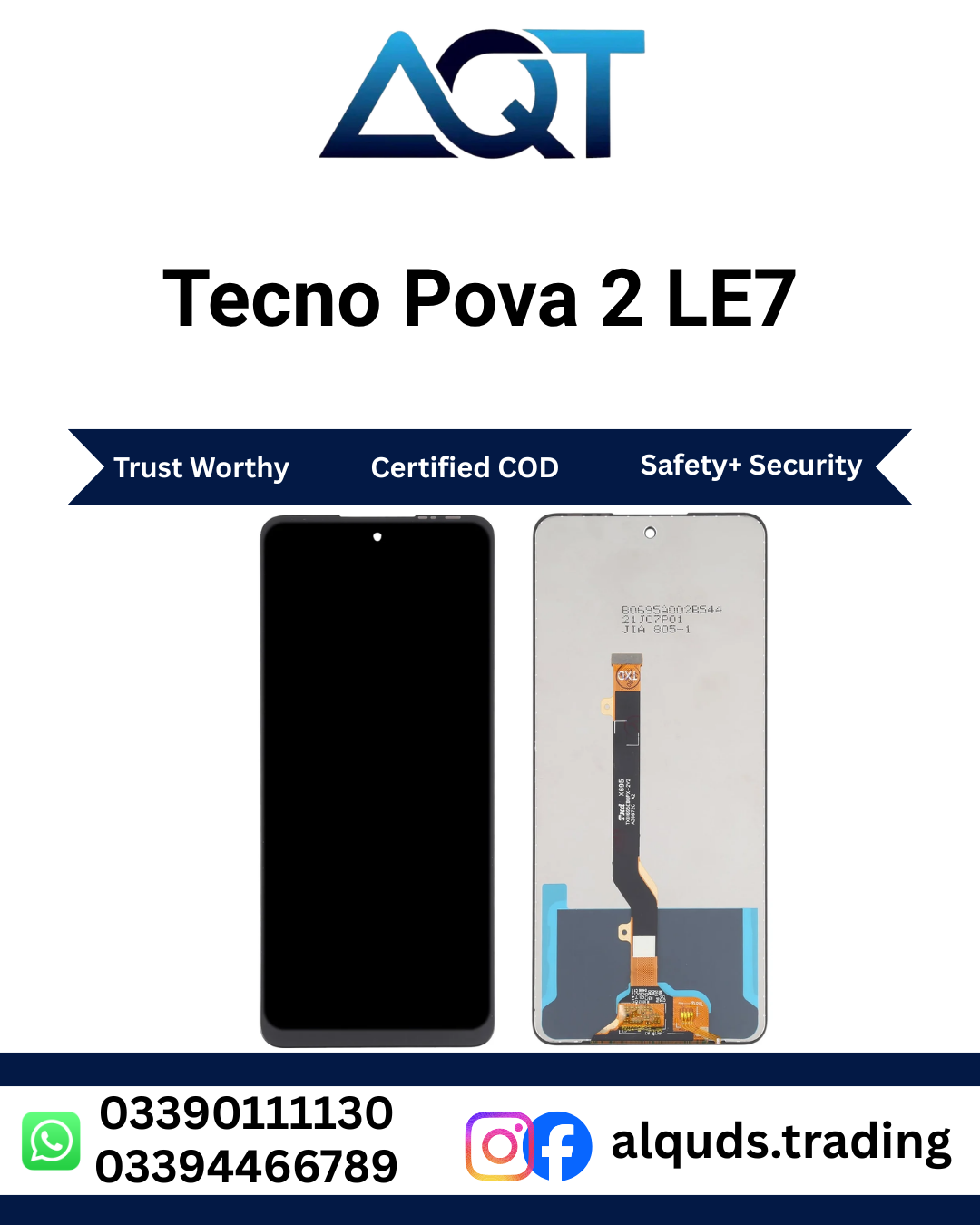

Buy Tecno Pova 2 LE7 LCD Panel from AQT Mobile Parts
If your Tecno Pova 2 has a cracked screen, damaged display, lines, dark patches, or touch problems, choosing the correct panel is an important step toward restoring everyday use. The Tecno Pova 2 LE7 LCD Panel is intended for customers looking for a display panel compatible with the Tecno Pova 2 model code LE7. Before ordering, confirm the model code on your phone or with a technician so you do not purchase a panel for a different Tecno device.
AQT Mobile Parts supplies mobile spare parts for retail customers and repair professionals. You can explore our Tecno mobile panels category to review available options. For a smooth purchase, compare the product title, model code, quality option, and listing details before placing your order.
Why Choose This Display Panel?
A damaged Tecno Pova 2 LE7 LCD Panel can make a phone difficult to use, even when the phone itself still powers on. A suitable replacement can help a repair technician address Tecno Pova 2 LE7 LCD Panel damage and restore the screen experience when the panel is the source of the problem. Selecting the correct part is important because panels made for different models may have different dimensions, connectors, or fitting points.
Customers should choose based on verified compatibility, the quality option shown on the product listing, their budget, and the technician’s advice. Avoid assuming that every panel described as an LCD has the same brightness, colour, touch response, or durability. Quality can vary between suppliers and grades, so check the exact option offered before confirming the purchase.
Signs Your Tecno Pova 2 Display May Need Attention
Some Tecno Pova 2 LE7 LCD Panel problems are caused by a damaged display panel, while others may come from software, the battery, a loose connector, or another internal component. A technician should inspect the phone before replacing parts. Common signs that warrant a proper check include:
- Cracked glass: Visible cracks after a drop may affect safe and comfortable use. Glass damage alone does not always mean the LCD underneath has failed.
- Black areas or ink-like marks: Dark patches that spread or remain visible may indicate damage to the display layers.
- Lines across the screen: Coloured or white lines can be linked to panel damage or a connector issue.
- Flickering or unstable brightness: If the screen repeatedly flickers, have the panel, connector, and power supply checked.
- No picture: A phone that vibrates or rings but shows no image may have a display fault, though diagnosis is still necessary.
- Touch not responding: Some faults involve the touch layer, connector, or software rather than the display alone.
These symptoms are not a guarantee that the panel is faulty. Back up important data if possible, avoid pressing on cracked glass, and ask a trained technician to test the phone before installing a replacement component.
Check Model Compatibility Before Ordering
The model code is one of the most useful details when selecting a Tecno Pova 2 LE7 LCD Panel. This listing refers to the Tecno Pova 2 LE7. Do not rely on a similar phone name or appearance alone. Tecno has multiple Pova models, and parts are not automatically interchangeable between them.
Before purchasing, check the model code in the phone settings, on the original box, on a device label where available, or through a qualified repair professional. If the phone cannot be switched on, a technician can help identify the exact model safely. Compare the model code with the product listing and ask the seller to confirm compatibility if any detail is unclear.
Do not order solely because a listing mentions Pova or because the connector appears similar in a photograph. Small differences in frame shape, flex cable placement, connector design, and dimensions can prevent correct installation. Correct identification helps reduce avoidable delays, return requests, and fitting problems.
Understand Display Quality Options
Tecno Pova 2 LE7 LCD Panel may be offered in different quality grades. The exact grades available can change, so select only an option that is clearly listed for this product or confirmed by AQT Mobile Parts before payment.
Standard Replacement-Grade Panels
These are generally selected by customers who need a practical repair at a budget-conscious price. Performance and finish depend on the particular supplier and batch, so confirm the stated grade rather than assuming all standard panels perform identically.
Higher-Grade Panels
Some listings may offer a higher-grade option for customers who prioritise display appearance or touch performance. Ask which grade is available, what it includes, and whether it has been tested. Do not assume that a higher price automatically proves original manufacturer status.
Original or OEM Descriptions
Terms such as Original and OEM can be used differently by different sellers. Ask for a clear explanation of the exact part being supplied and rely on the listing’s stated details rather than a label alone. AQT Mobile Parts can clarify available quality options before you order.
When comparing display panels, compare the same quality grade across sellers. A lower price may reflect a different grade, included frame, testing standard, warranty conditions, or stock source. Confirm these details before comparing prices.
What to Check Before Placing Your Order
- Correct model: Confirm Tecno Pova 2 and model code LE7.
- Quality selection: Read the selected grade and product details carefully.
- Frame included or not: Check whether the product includes a frame or is a panel-only part.
- Stock and price: Confirm current availability and the final price before payment.
- Warranty or checking terms: Ask about applicable checking, testing, and warranty conditions before installation.
- Delivery details: Verify the delivery method, charges, estimated timeline, and packaging.
- Professional fitting: Confirm whether you will install it yourself or have a technician complete the repair.
Product options, prices, stock, and terms can change. Use the current listing and direct confirmation from the seller as the source for the exact option you intend to purchase.
Professional Installation and Testing
Installing a Tecno Pova 2 LE7 LCD Panel requires careful handling of delicate connectors and internal components. If you are not experienced with mobile repairs, professional installation is recommended. A technician should power down the phone, follow safe disassembly procedures, disconnect the battery where appropriate, and handle flex cables without pulling or bending them sharply.
Before permanently securing the Tecno Pova 2 LE7 LCD Panel, a technician should test the part according to safe workshop practice. Checks may include whether the screen displays an image, brightness is adjustable, colours appear consistent, and touch input works across the usable screen area. The technician should also check for flicker, lines, dead areas, and loose connections.
Testing before final assembly can help identify a faulty part or installation issue while access to the connector is still available. Do not force a connector into place, use excessive heat, or press hard on the display. Improper fitting can damage the new panel, the phone’s frame, or other components.
Care Tips After Screen Repair
After repair, handle the phone carefully while any adhesive or sealing materials settle according to the technician’s instructions. Use a suitable case and screen protector if compatible with the fitted panel. Avoid dropping the device, twisting it in a pocket, or applying pressure to the screen.
Keep the phone away from liquids and excessive heat. A Tecno Pova 2 LE7 LCD Panel repair does not automatically restore the phone’s original water resistance, so do not assume it is safe to submerge or expose it to moisture. If the Tecno Pova 2 LE7 LCD Panel begins flickering, develops lines, or stops responding after repair, stop applying pressure and return to the technician for inspection.
Clean the screen with a soft, non-abrasive cloth. Avoid harsh chemicals and do not spray liquid directly into openings. Good handling can reduce the risk of accidental damage, but no Tecno Pova 2 LE7 LCD Panel is immune to impact or pressure.
Tecno Pova 2 LE7 LCD Panel Price in Pakistan
The price of a Tecno Pova 2 LE7 LCD Panel can vary with quality grade, availability, supplier batch, whether a frame is included, and market conditions. For this reason, confirm the current price on the product page or contact AQT Mobile Parts before placing an order. If you are comparing offers, make sure each seller is quoting the same model and a comparable quality option.
Consider the full repair cost, not just the panel price. Installation charges, delivery fees, and any applicable checking or warranty terms can affect the total. Ask for the final payable amount and confirm the selected quality before payment so there are no surprises.
AQT Mobile Parts serves mobile repair professionals and individual customers from Lahore to all Pakistan. Availability and delivery timing depend on stock, destination, and courier arrangements. Confirm dispatch details and delivery charges when ordering.
Why Buy from AQT Mobile Parts?
AQT Mobile Parts focuses on mobile spare parts for customers who need components for repairs and maintenance. Whether you are a technician sourcing a panel for a customer’s phone or a device owner arranging a repair, clear model identification and an accurate quality selection can make the buying process easier.
When contacting the store, share the full phone model and model code, tell the team which quality option you need, and ask any questions about stock, price, delivery, or checking terms. If you are a repair professional, confirm the part details before opening or fitting it. This helps both sides work from the same product information.
For the best purchase experience, do not rely on a model name alone. Match the listing to your device, verify the condition and grade being supplied, and have Tecno Pova 2 LE7 LCD Panel checked by a qualified technician. These steps can help you choose the right display panel for your repair needs.
Frequently Asked Questions
1. Which phone is this LCD panel for?
This listing is for the Tecno Pova 2 with model code LE7. Confirm your device’s exact model code before ordering, especially if your phone belongs to another Tecno Pova series.
2. How can I confirm that Tecno Pova 2 LE7 LCD Panel will fit?
Check the model code in the phone settings or on its packaging, then compare it with the listing. If the phone cannot turn on, ask a technician or the seller to help identify the model.
3. Does the product include a frame?
Frame inclusion depends on the specific option listed. Review the product details or contact AQT Mobile Parts to confirm whether the selected item is a panel-only part or includes a frame.
4. Can I install Tecno Pova 2 LE7 LCD Panel myself?
Mobile screen repair involves delicate connectors and components. Unless you have suitable repair experience and tools, have a trained technician install and test the panel.
5. Why is my screen black even though the phone rings?
A failed display is one possible cause, but a loose connector or another hardware fault may produce similar symptoms. A technician should diagnose the device before a part is replaced.
6. Why is touch not working properly?
Touch problems can come from display damage, a connector, software, or another internal fault. Ask for a proper diagnosis and test touch across the screen after installation.
7. How do I compare Tecno Pova 2 LE7 LCD Panel prices?
Compare the same model code, quality grade, frame inclusion, testing conditions, warranty terms, and delivery cost. Confirm the current price with each seller before ordering.
8. Do you deliver Tecno Pova 2 LE7 LCD Panel across Pakistan?
AQT Mobile Parts serves customers from Lahore to all Pakistan. Contact the store to confirm current stock, delivery options, charges, and estimated arrival time for your location.
Order Your Tecno Pova 2 LE7 LCD Panel
Before ordering, verify your model code, select the correct quality option, and confirm the current price and delivery terms. If you are unsure which part is compatible, contact AQT Mobile Parts for clarification before installation. Choosing the right panel and having it professionally tested can help make the repair process more straightforward.
For official brand information, visit the official TECNO website.



Reviews
There are no reviews yet.