





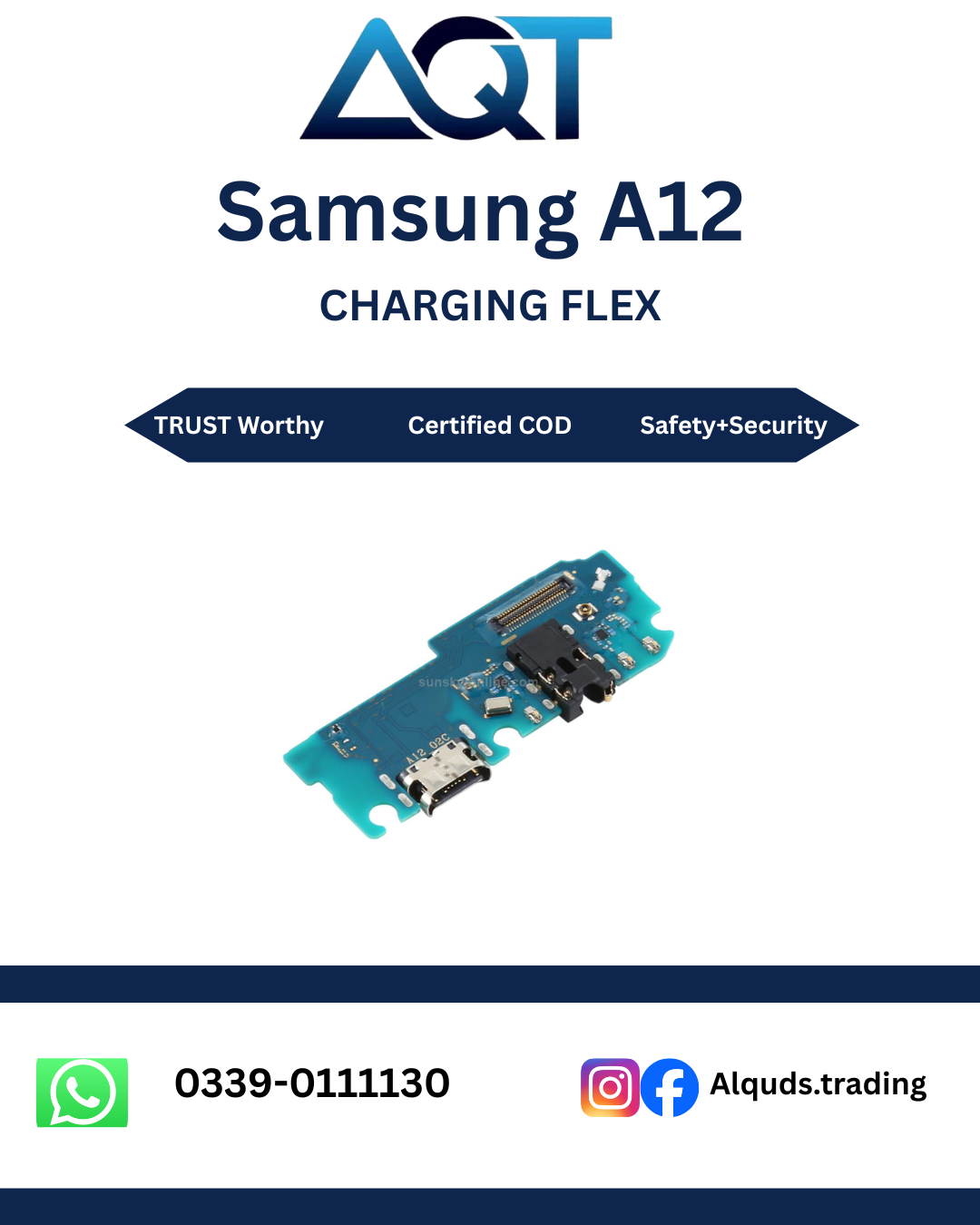

Samsung A12 Charging Flex – Best Quality
Keep your Samsung Galaxy A12 dependable with a suitable Samsung A12 Charging Flex from AQT Mobile Parts. This component is relevant when a compatible phone has charging connection problems, but the correct diagnosis matters before you purchase any spare part. Check the device model, connector design, and the condition of the charging board before ordering. Visit AQT Mobile Parts to explore mobile spare parts and contact the team about availability.
Samsung A12 Charging Flex for Repair and Maintenance
The Samsung A12 Charging Flex is part of the phone’s charging connection assembly. Depending on the exact device version and part design, the assembly may include a charging connector and related small components. A damaged, worn, corroded, or physically loose connector can interrupt charging. A compatible Samsung A12 Charging Flex may be considered when inspection shows that the flex or charging assembly is the cause of the fault.
Not every charging problem means the flex needs replacement. A faulty wall adapter, damaged cable, lint inside the port, battery issue, software problem, or board-level fault can create similar symptoms. A technician should inspect the device carefully before fitting a new component. Confirm the Samsung A12 Charging Flex is the part indicated by the diagnosis. This avoids unnecessary parts replacement and helps identify the actual cause.
Why Choose the Correct Charging Flex?
Choosing the correct Samsung A12 Charging Flex helps reduce compatibility problems during repair, especially when comparing similar-looking charging assemblies. Mobile parts can look similar while having different connector layouts, mounting points, or circuit designs. Confirm the exact model code printed on the device or shown in its settings, and compare it with the seller’s compatibility information. If you are unsure, share the model code and clear photos of the old part with the supplier before placing an order.
A suitable part gives the repair technician the right starting point for restoring the charging connection. The Samsung A12 Charging Flex must match the phone’s connector and mounting layout. Part quality, careful installation, and a proper test all matter. Even a correctly matched flex may not resolve a fault caused by a damaged motherboard, battery, or charging IC, so a reliable diagnosis remains important.
Common Signs of a Charging Flex Problem
Charging Starts and Stops
If charging repeatedly connects and disconnects when the cable is inserted, inspect the cable, adapter, port, and charging assembly. Movement-sensitive charging can indicate a loose or damaged connector, although a worn cable or broken solder joint may cause similar behaviour. Ask a technician to check whether the Samsung A12 Charging Flex is actually responsible before purchasing a part.
The Cable Does Not Fit Securely
A charging cable that feels unusually loose may point to lint, physical wear, or damage inside the port. Do not force the cable or scrape the connector with metal tools. If the port is bent or the assembly is damaged, professional inspection can establish whether the flex needs to be changed.
Charging Is Very Slow
Slow charging may be caused by a low-power adapter, an unsuitable cable, background activity, battery ageing, excess heat, or a fault in the charging circuit. Test with a known-good compatible cable and adapter before deciding whether the Samsung A12 Charging Flex needs replacement. If the issue remains, a technician can inspect the charging path and decide whether a Samsung A12 Charging Flex is required for this device.
The Phone Does Not Respond When Connected
A phone that shows no charging indicator needs systematic troubleshooting before you order a Samsung A12 Charging Flex. Check the power source and accessories first. Look for signs of moisture, impact, corrosion, or overheating. Avoid repeated charging attempts if the phone becomes unusually hot or shows visible damage. A technician may need to test the battery and board as well as the charging port.
Benefits of a Suitable Replacement Part
- Repair-focused solution: A compatible flex can address a fault traced to the charging connector assembly.
- Better connection fit: Correct matching helps the assembly align with the phone’s frame and internal connectors.
- Support for routine servicing: The part can be used by repair professionals handling charging-related service jobs.
- Less guesswork: Confirming the model and part before ordering helps avoid buying an incompatible component.
- Useful for repair businesses: Retail customers and technicians can ask about availability and quality before purchasing.
These benefits depend on accurate diagnosis, correct compatibility, part condition, and skilled installation. A new part cannot guarantee a repair if another component is defective. For this reason, test the phone before opening it and record the original symptoms. Part quality, careful installation, and a proper test all matter when fitting a Samsung A12 Charging Flex.
Compatibility Checks Before Ordering
Before buying a Samsung A12 Charging Flex, verify the exact Galaxy A12 model variant. Do not rely on the phone’s marketing name alone when model codes are available. Similar Samsung models may use different parts, and a flex designed for another model may not fit or work correctly.
- Check the model number in the phone settings, on the device label, or in the original documentation.
- Compare the old flex’s connector shape, cable route, mounting holes, and component layout with the offered part.
- Ask the supplier to confirm compatibility using the complete model code.
- Inspect product photographs carefully and request additional pictures if the connector details are unclear.
- Confirm the part’s stated quality, condition, warranty terms, and return policy before payment for the Samsung A12 Charging Flex.
If the phone has been repaired previously, it may contain a non-original assembly or modified connectors. Share that information with the technician before they fit the Samsung A12 Charging Flex. Never assume that a part is compatible solely because the listing mentions Samsung A12.
Quality, Handling, and Inspection
Charging flex parts may be sold in different quality grades depending on the supplier. Ask what grade is available and whether the part is new, tested, or otherwise described by the seller. Do not treat words such as original, OEM, premium, or high quality as proof by themselves. Request a clear explanation of the supplied grade and inspect the part on arrival.
A good incoming inspection of the Samsung A12 Charging Flex should check the flex cable for creases, tears, lifted components, corrosion, bent connectors, and damaged contact points. The connector should be clean and the assembly should match the expected layout. Handle the part by its edges and avoid touching exposed contacts unnecessarily. Keep it in suitable anti-static packaging until installation.
A Samsung A12 Charging Flex should not be bent sharply, pulled by its cable, or pressed into place with force. Tiny connectors and flexible circuits can be damaged by rough handling. If the part does not align naturally, stop and verify the model and orientation rather than forcing it.
Professional Installation and Testing
Opening a smartphone requires appropriate tools, care, and experience. The repair process may involve removing the back cover, disconnecting the battery, taking out shields or brackets, and accessing the charging assembly. The exact procedure depends on the device construction and the specific Samsung A12 Charging Flex assembly. A trained technician should follow a model-specific repair guide and use suitable tools when installing a Samsung A12 Charging Flex.
- Back up important data when possible and power the phone off before repair.
- Inspect the phone for impact damage, moisture, swelling, and previous repair work.
- Disconnect the battery safely before handling internal connectors.
- Remove the relevant components carefully, keeping screws and brackets organised.
- Compare the old assembly with the new part before installation.
- Seat connectors evenly and route the flex without pinching or stretching it.
- Reconnect the battery and test the assembly before fully resealing the phone.
- Check charging stability and inspect for abnormal heating or other symptoms.
Do not attempt internal repair if you lack the tools or experience. Lithium-ion batteries can be hazardous if punctured or bent, and careless handling may damage the display, frame, or motherboard. Professional service is the safer option for uncertain repairs.
Testing After Installation
After fitting a Samsung A12 Charging Flex, test the phone with a compatible, known-good charger and cable. Confirm that the connector seats normally and the charging indicator remains stable. Observe whether the battery percentage increases over a reasonable period, remembering that charging speed depends on battery level, temperature, charger output, and phone activity.
Check the connection gently without repeatedly wiggling or stressing the port. Inspect for unexpected heat, disconnects, warning messages, or charging behaviour that differs from normal. If the issue persists after fitting the Samsung A12 Charging Flex, do not assume the new part is faulty immediately. The cable, adapter, battery, charging IC, connector seating, or motherboard may require further diagnosis.
Test additional functions affected during disassembly, including the microphone or other components only if they are part of the repair area or were disconnected during service. Complete the repair only after the technician is satisfied that connectors are seated correctly and the phone operates normally.
How to Help Protect the Charging Port
- Use a good-quality cable and a compatible power adapter.
- Insert and remove the cable by holding the connector, not by pulling the wire.
- Keep the charging port dry and avoid charging a wet device.
- Do not force connectors that do not fit easily.
- Keep lint and debris out of the port; have stubborn dirt removed safely by a technician.
- Avoid using the phone in ways that put strong sideways pressure on the charging cable.
- Stop charging if you notice unusual heat, a burning smell, swelling, or visible damage.
Good habits can reduce wear on the port and help protect the Samsung A12 Charging Flex, but no part lasts forever. If charging becomes unreliable, arrange an inspection early so a minor connector issue does not lead to further damage.
Buying from AQT Mobile Parts
AQT Mobile Parts, also known as Al Quds Trading, supplies mobile phone spare parts through retail and wholesale channels. Customers can ask about the availability and grade of a Samsung A12 Charging Flex before ordering. Confirm that the Samsung A12 Charging Flex matches the exact device variant. If you are a technician or shop owner, confirm the quantity of Samsung A12 Charging Flex units required and whether the supplied part matches the model code you have provided.
For buyers in Lahore and customers ordering from other parts of Pakistan, verify the price, delivery method, payment details, stock status, and any applicable warranty or return conditions before confirming the purchase. Availability can change, so ask the team to confirm current stock rather than assuming that every grade is always available.
When contacting the seller, provide the complete phone model code, the fault symptoms, and photographs of the existing assembly if possible. This helps the team identify the part you need and reduces the chance of ordering an incompatible flex. If you are purchasing for a repair shop, clarify whether you need a single piece or multiple units.
Frequently Asked Questions
What Does the Samsung A12 Charging Flex Do?
It forms part of the phone’s charging connection assembly. Depending on the design, it carries the charging connector and related connections. A technician should confirm the exact assembly and fault before replacing it.
Will a New Flex Fix Every Charging Problem?
No. Slow or failed charging can also come from the cable, adapter, battery, debris, moisture damage, charging IC, or motherboard. Diagnose the cause before buying a part.
How Can I Confirm Compatibility?
Check the complete model code and compare the connector layout and part design of the Samsung A12 Charging Flex. Ask the supplier to confirm that the Samsung A12 Charging Flex is compatible before placing an order, especially if the phone has had a previous repair.
Can I Install It at Home?
Internal phone repair involving a Samsung A12 Charging Flex requires specialist tools and careful battery handling. If you do not have repair experience, use a qualified technician to avoid damaging the phone or causing injury.
How Should I Choose the Right Quality?
Ask the seller to explain the available grades, condition, testing status, and applicable warranty terms. Inspect the part when it arrives and avoid relying only on a quality label.
Can I Order for Wholesale?
Retail and wholesale buyers can contact AQT Mobile Parts to ask about current stock of the Samsung A12 Charging Flex. Confirm the exact model and required grade before payment.
What Information Should I Provide Before Ordering?
Share the model code, a description of the charging fault, and clear photos of the old Samsung A12 Charging Flex if available. Also confirm the required quantity and ask about returns for compatibility issues.
Order Samsung A12 Charging Flex from AQT Mobile Parts
If troubleshooting confirms that the charging assembly is faulty, contact AQT Mobile Parts to check the current availability and quality options for the Samsung A12 Charging Flex. Ask about the Samsung A12 Charging Flex grade, compatibility, and stock before confirming the purchase. Confirm compatibility, price, delivery arrangements, and applicable terms before placing your order. Whether you are repairing your own device or sourcing parts for customers, accurate model matching and careful testing are essential for a dependable repair.
Choose the part only after verifying the phone variant and diagnosis. For service providers, test the assembly before completing the repair and explain any remaining issues to the customer. A careful selection process for the Samsung A12 Charging Flex helps reduce unnecessary returns and supports better repair outcomes.
For official device information and support resources, visit Samsung’s official website.

Reviews
There are no reviews yet.