


 FLEX CABLE STRIPS
 Camera Components
 Outer Parts
 Batteries




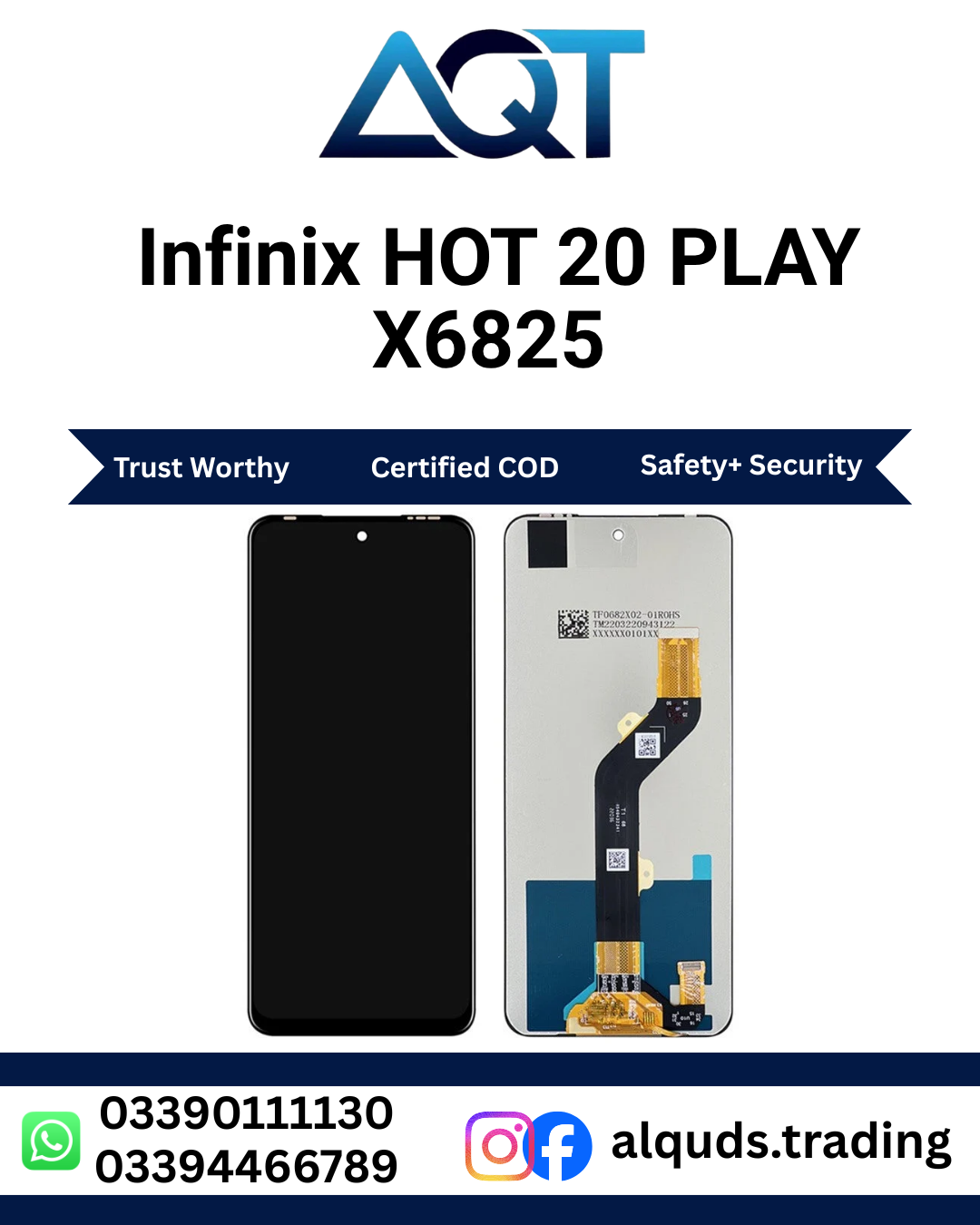

Infinix HOT 20 PLAY X6825 LCD Panel | Premium Quality
The Infinix HOT 20 PLAY X6825 LCD Panel is a suitable screen replacement solution for the Infinix HOT 20 PLAY when the existing display is cracked, damaged, showing lines, producing dark spots, flickering, or experiencing touch problems. The model number X6825 is specifically associated with the HOT 20 PLAY, so checking the model number before ordering is important for proper compatibility.
A damaged smartphone screen can make everyday phone usage difficult. Problems such as broken glass, poor display quality, unresponsive touch, black areas, or abnormal colors can affect browsing, messaging, video playback, gaming, and other normal activities. Replacing the damaged screen with a compatible Infinix HOT 20 PLAY X6825 LCD Panel can help restore the display and touch functions of the phone.
Infinix HOT 20 PLAY X6825 LCD Panel Features
This Infinix HOT 20 PLAY X6825 LCD Panel is designed for mobile phone repair and is suitable for technicians, repair shops, spare-parts dealers, and customers who need a replacement screen for the X6825 model.
- Compatible with Infinix HOT 20 PLAY X6825
- Suitable for mobile screen repair
- Clear display performance
- Responsive touch operation
- Suitable for professional repair technicians
- Useful for damaged or faulty screens
- Available for retail and repair requirements
Why Replace Your Infinix HOT 20 PLAY X6825 LCD Panel?
The screen is one of the most important components of a smartphone. When it becomes damaged, normal operation can become difficult. A cracked screen can make text harder to read, while touch damage can prevent the user from properly operating applications.
Common reasons for replacing an Infinix HOT 20 PLAY X6825 LCD Panel include cracked glass, black spots, vertical lines, horizontal lines, flickering, dead areas, display discoloration, low brightness, and touch failure.
Physical impact is one of the most common causes of screen damage. A phone dropped onto a hard surface can damage the LCD, touch digitizer, flex cable, or connector. In some situations, the screen may appear physically acceptable while the internal display layer has already been damaged.
Check the X6825 Model Before Ordering
Before ordering an Infinix HOT 20 PLAY X6825 LCD Panel, always check the model number of your smartphone. The Infinix HOT 20 PLAY is commonly identified as model X6825. Replacement LCD listings also specifically identify X6825 as the compatible model. :contentReference[oaicite:1]{index=1}
It is important not to select a panel based only on the words “Infinix HOT 20.” The HOT 20 product family includes different models, and the standard HOT 20 is commonly identified as X6826 while the HOT 20 PLAY uses X6825. :contentReference[oaicite:2]{index=2}
Checking the exact model number helps reduce the risk of purchasing the wrong panel. You should also compare the connector, flex cable, physical dimensions, and existing display assembly when possible.
Common Infinix HOT 20 PLAY Screen Problems
A faulty display can produce several different symptoms. Some of the most common problems include:
- Cracked front glass
- Broken LCD display
- Black or blank screen
- Vertical or horizontal lines
- Flickering display
- Dark spots
- Dead pixels or display areas
- Unresponsive touch
- Ghost touch
- Abnormal colors
- Low or uneven brightness
- Display distortion
Not every display problem means that the LCD panel itself is faulty. A damaged connector, flex cable, motherboard component, or water damage can produce similar symptoms. For this reason, proper diagnosis is recommended before replacing the screen.
Test the Infinix HOT 20 PLAY X6825 LCD Panel Before Installation
Testing the Infinix HOT 20 PLAY X6825 LCD Panel before final installation is an important part of professional mobile repair. Do not immediately apply adhesive or permanently fit the panel into the frame.
- Switch off the phone before beginning the repair.
- Open the device carefully using appropriate repair tools.
- Disconnect the battery before handling internal components.
- Connect the replacement LCD panel to the appropriate connector.
- Power on the phone and check the display.
- Test touch response across the complete screen.
- Check for lines, spots, flickering, or abnormal colors.
- Test brightness and viewing performance.
- Complete the installation only after successful testing.
Replacement-screen installation guides also recommend testing the screen before permanently installing it and checking both display quality and touch responsiveness. :contentReference[oaicite:3]{index=3}
Professional Installation Recommended
Installing a mobile LCD panel requires experience and suitable repair equipment. If the existing screen is glued to the phone frame, removing it incorrectly can damage the frame, flex cable, motherboard, or other internal components.
For customers without mobile repair experience, professional installation is recommended. A qualified technician can inspect the phone, test the replacement panel, remove the damaged screen, clean the frame, and install the new panel correctly.
When installing an Infinix HOT 20 PLAY X6825 LCD Panel, the technician should also make sure that the LCD flex cable is positioned correctly and is not unnecessarily bent or compressed.
Display Quality and Touch Performance
The display is responsible for both visual information and touchscreen interaction. A properly functioning panel should provide a clear image and allow the user to interact with the phone smoothly.
After installation, technicians should test different areas of the screen rather than checking only the center. Touch should be tested along the edges, corners, and middle of the display to identify any unresponsive area.
It is also important to check the screen for dead pixels, lines, unusual colors, uneven brightness, or flickering. Testing these functions before final installation can make the repair process easier.
Suitable for Mobile Repair Shops and Technicians
The Infinix HOT 20 PLAY X6825 LCD Panel can be useful for mobile repair shops and technicians handling damaged Infinix smartphones. Keeping commonly requested Infinix panels available can help repair businesses respond quickly to customer requirements.
For technicians, accurate model identification is especially important because similar Infinix model names can refer to different devices. Always verify X6825 before fitting the panel.
Buy Infinix HOT 20 PLAY X6825 LCD Panel in Pakistan
If you are searching for an Infinix HOT 20 PLAY X6825 LCD Panel in Pakistan, AQT Mobile Parts provides mobile phone parts and LCD panels for different smartphone models.
You can also explore the complete Infinix Panels category to find LCD panels for other Infinix smartphones. This category can be useful for technicians and customers who need panels for different Infinix models.
When ordering a panel, confirm the model number before completing your purchase. For this product, the important model identification is X6825.
How to Choose the Correct X6825 LCD Panel
Choosing the correct replacement panel involves more than checking the phone’s marketing name. Follow these steps before ordering:
- Confirm that your phone model is X6825.
- Confirm that the product is listed for HOT 20 PLAY.
- Compare the replacement connector with the existing panel.
- Check the panel type and quality variation.
- Inspect the panel for physical damage when received.
- Test the panel before permanent installation.
- Use a qualified technician for installation when required.
These steps can help minimize compatibility and installation problems.
Why Choose AQT Mobile Parts?
AQT Mobile Parts specializes in mobile phone parts and repair products for customers and technicians in Pakistan. The store offers LCD panels and other mobile components covering multiple smartphone brands and models.
For customers looking for an Infinix HOT 20 PLAY X6825 LCD Panel, accurate model identification and proper testing are important parts of the replacement process.
For general information about Infinix smartphones and the company’s products, you can visit the official Infinix website.
Infinix HOT 20 PLAY X6825 LCD Panel FAQs
What is the model number of the Infinix HOT 20 PLAY?
The Infinix HOT 20 PLAY is commonly identified by model number X6825. Replacement LCD listings specifically identify X6825 as the compatible HOT 20 PLAY model. :contentReference[oaicite:4]{index=4}
Is X6825 the same as the standard Infinix HOT 20?
No. X6825 is associated with the HOT 20 PLAY, while the standard HOT 20 is commonly listed as X6826. Always check the exact model number before ordering a replacement panel. :contentReference[oaicite:5]{index=5}
What problems can require an X6825 LCD replacement?
Common problems include cracked glass, black display, lines, flickering, dark spots, damaged pixels, abnormal colors, and unresponsive touch. However, connector or motherboard faults can sometimes cause similar symptoms.
Should I test the LCD before installing it?
Yes. Connect and test the Infinix HOT 20 PLAY X6825 LCD Panel before applying permanent adhesive. Check both the display and touch functions across the complete screen.
Can a technician install the Infinix HOT 20 PLAY LCD Panel?
Yes. Professional installation is recommended, especially when the damaged screen needs to be removed from the original frame. A trained technician can reduce the risk of damage during installation.
How can I avoid ordering the wrong Infinix LCD panel?
Check the model number printed on the phone or shown in the device information. For the HOT 20 PLAY, confirm that the model is X6825 before ordering.
Where can I find other Infinix LCD panels?
You can browse the Infinix Panels category at AQT Mobile Parts for panels for different Infinix smartphone models.
Final Note
The Infinix HOT 20 PLAY X6825 LCD Panel is a model-specific screen replacement solution for the Infinix HOT 20 PLAY. Confirm the X6825 model number before ordering, inspect the panel when received, test display and touch functions before permanent installation, and use professional installation when necessary. Selecting the correct model and following proper testing procedures can help restore reliable screen performance to your Infinix smartphone.
Reviews
There are no reviews yet.