





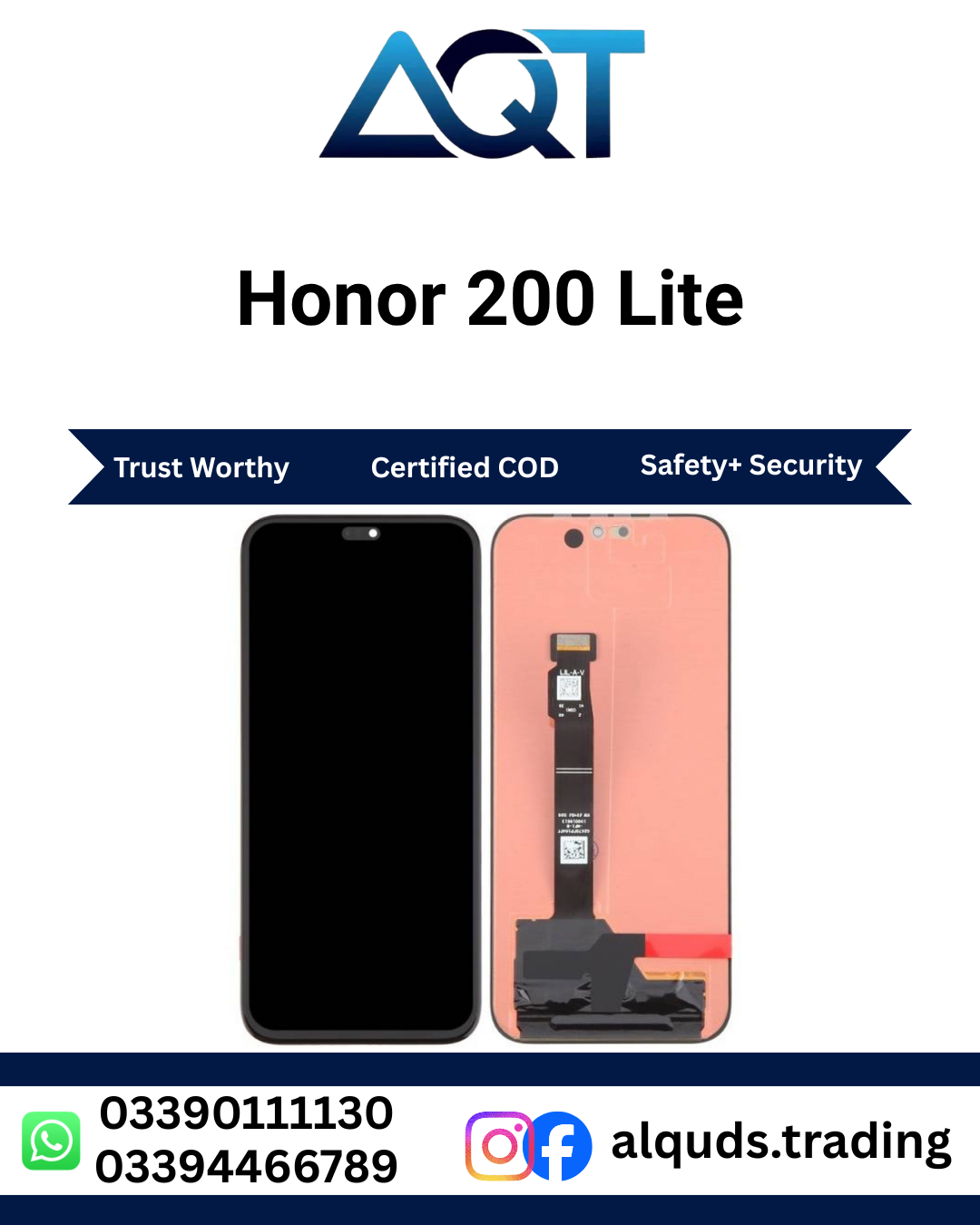

Honor 200 Lite Original Panel | Best Quality AMOLED Display
Looking for an Honor 200 Lite Original Panel for a professional mobile screen repair? AQT Mobile Parts offers mobile display panels and spare parts for repair technicians, retailers, wholesalers, and individual customers. If your Honor 200 Lite has a damaged screen, display lines, touch problems, or a blank display, selecting the correct compatible panel is an important step toward a successful repair.
Visit AQT Mobile Parts to explore mobile spare parts and check product availability. Before placing an order, confirm the exact handset model, display quality, panel condition, connector layout, and current stock with our team.
The Honor 200 Lite features an AMOLED display. AMOLED technology is known for deep blacks, vibrant colours, and strong contrast. When choosing an Honor 200 Lite Original Panel, compatibility and verified quality are essential because display components that look similar may differ in construction, performance, and connector design.
What Is the Honor 200 Lite Original Panel?
The Honor 200 Lite Original Panel is a display component intended for compatible Honor 200 Lite smartphones. The display assembly allows users to view images, videos, apps, messages, websites, and other content. Depending on the supplied part, the assembly may include the display and touch-sensitive layers, while other components may need to be transferred from the original handset.
When the Honor 200 Lite Original Panel is cracked, damaged, or no longer displaying content correctly, a compatible replacement panel may be required. The correct solution depends on the type of damage and the condition of the phone’s display connector, internal flex cables, and mainboard.
Customers should understand the difference between an original service part, an OEM-labelled product, and a compatible aftermarket panel. These terms are not always used consistently by suppliers. Always ask about the actual quality grade and verify authenticity before purchasing a panel advertised as original.
Honor 200 Lite AMOLED Display Technology
The Honor 200 Lite uses AMOLED display technology. Unlike traditional LCD displays that rely on a separate backlight, AMOLED displays use self-emitting pixels. Each pixel can produce its own light, allowing dark areas of the image to appear very dark while bright areas remain vivid.
Deep Blacks and Strong Contrast
One benefit of AMOLED technology is its ability to display deep blacks. Pixels can switch off in dark areas, helping create strong contrast between light and dark content. This is useful when viewing photographs, watching videos, reading, or using applications with dark interfaces.
Vibrant Colour Presentation
AMOLED displays can provide rich and vibrant colours. A suitable replacement Honor 200 Lite Original Panel should be checked for colour consistency, brightness, and image clarity. Actual results depend on the authenticity, quality, condition, and specifications of the supplied display.
Responsive Touch Interaction
The touch-sensitive system lets users interact with the phone by tapping, typing, scrolling, and navigating applications. A correctly fitted compatible display should respond consistently across the usable screen area. Dead touch zones, ghost touches, and delayed responses should be investigated before the repair is considered complete.
Common Signs That Your Honor 200 Lite Panel Needs Repair
Screen damage can appear in several ways. Some problems are visible immediately, while others develop after a drop, pressure, liquid exposure, or internal component failure. A technician should inspect the phone before deciding whether the display assembly needs replacement.
1. Cracked or Broken Screen
A fall or accidental impact can crack the display glass or damage the display underneath. Even when the phone still turns on, cracks may spread and make the screen harder to use. Broken glass can also create sharp edges, so avoid pressing damaged areas.
2. Black Screen or No Display
If the phone vibrates, rings, or responds to other functions but the screen remains black, the display assembly may be damaged. However, a loose display connector, battery issue, or mainboard fault can produce similar symptoms. Diagnosis is necessary before ordering an Honor 200 Lite Original Panel.
3. Lines on the Display
Vertical lines, horizontal lines, coloured streaks, or unusual patterns may indicate damage to the display panel or its connections. These symptoms can appear after impact or pressure. A technician should inspect the display and connector to identify the source of the problem.
4. Flickering or Unusual Brightness
Display flickering, inconsistent brightness, or unusual colour changes can indicate a faulty panel or another hardware or software issue. If restarting the device does not resolve the problem, arrange a proper inspection before replacing components.
5. Touchscreen Not Responding
If parts of the screen do not respond to touch, typing becomes difficult and applications may be hard to operate. Touch failure can result from a damaged touch layer, faulty display assembly, connector problem, or other internal fault.
6. Ink-Like Spots or Dark Patches
Dark patches, spreading black areas, and coloured blotches may indicate internal AMOLED damage. The glass may appear intact while the display underneath is damaged. A technician can determine whether the display assembly requires replacement.
Benefits of Choosing a Compatible Honor 200 Lite Original Panel
Restores Display Functionality
A suitable Honor 200 Lite Original Panel can restore visual output when the original panel is confirmed to be defective. This can make it easier to use messaging applications, browse websites, view photos, and operate everyday phone functions.
Supports Clear Image Quality
Display quality affects text readability, colour appearance, brightness, and the overall viewing experience. Buyers should confirm the supplied panel’s grade and test image quality before final installation.
Helps Restore Touch Operation
When the touch layer is included in the supplied assembly and the fault is display-related, replacing the defective component may restore touch response. Proper testing is important to confirm that the whole screen responds correctly.
Useful for Professional Repair Shops
Mobile repair technicians need compatible display parts to complete customer repairs. Checking model details, connector placement, panel condition, and quality grade before installation helps reduce fitting mistakes and unnecessary repair delays.
Supports Retail and Wholesale Purchasing
AQT Mobile Parts serves both individual customers and businesses looking for mobile spare parts. Repair shops and wholesalers should confirm stock availability, quality classification, pricing, and applicable purchase terms before ordering multiple units.
How to Check Honor 200 Lite Panel Compatibility
Before purchasing an Honor 200 Lite Original Panel, confirm that the display matches the exact phone. The model name is a useful starting point, but variant and connector checks can be important for accurate part selection.
- Confirm the handset model: Check the phone’s model information and compare it with the supplier’s listing.
- Check the model code: The Honor 200 Lite is associated with model codes such as LLY-NX1 in some markets. Confirm the code on the actual handset rather than relying only on the product name.
- Compare the connector: Check the flex connector position, shape, and contact layout against the original component.
- Compare the physical design: Check the panel dimensions, camera cut-outs, frame design, and other relevant assembly details.
- Confirm the display technology: The Honor 200 Lite uses AMOLED technology. Ask the supplier to confirm the actual panel type being offered.
- Verify the quality grade: Ask whether the product is a genuine original service part, OEM-labelled, or aftermarket-compatible.
- Check the supplied assembly: Confirm whether the part includes a frame or is supplied as a panel-only assembly.
When compatibility is uncertain, share clear photographs of the original panel and its connectors with the supplier. Do not force a connector or install a part that does not match the original assembly.
Important Checks Before Installing the Display
Testing the replacement display before final assembly helps identify problems while the phone is still accessible. A professional technician should follow an appropriate repair procedure and use suitable tools.
Inspect the New Panel
Check the display for cracks, marks, damaged flex cables, bent connectors, or other visible defects. If the panel arrives with damage, document the condition and contact the supplier before attempting installation.
Test Image Quality
After connecting the compatible panel according to the repair procedure, power on the device and check the image. Look for unusual lines, dark patches, colour abnormalities, flickering, and inconsistent brightness.
Test the Full Touch Area
Check touch response across the screen, including the edges and corners. Test typing, scrolling, tapping, and other common gestures. If a section does not respond properly, inspect the connector and display assembly before completing the repair.
Inspect the Fit and Frame
Make sure the Honor 200 Lite Original Panel sits correctly in the intended position. Incorrect fitting, trapped flex cables, excessive adhesive, or uneven pressure can damage a display or affect the final result.
Professional Installation of the Honor 200 Lite Original Panel
Display replacement requires careful handling of delicate internal components. If you do not have mobile repair experience, professional installation is recommended.
Step 1: Inspect and Diagnose the Phone
Confirm that the problem is related to the display. Check whether the phone powers on and whether the symptoms could be caused by a loose connector, battery issue, or mainboard fault.
Step 2: Power Off the Device
Switch off the phone and follow a model-appropriate disassembly procedure. Internal connectors should be handled carefully, and the battery should be disconnected according to safe repair practice before working on display connections.
Step 3: Remove the Damaged Assembly
Use suitable tools and the correct opening procedure. Avoid excessive force, unsafe heating, and pressure on the battery or remaining components. Carefully disconnect the display flex cable.
Step 4: Compare the Replacement Panel
Before fitting the new Honor 200 Lite Original Panel, compare its connector layout and physical dimensions with the original component. Stop if the design does not match.
Step 5: Test Before Final Assembly
Connect and test the replacement display using the appropriate procedure. Check image output, touch response, brightness, and visible defects before permanently securing the assembly.
Step 6: Complete the Repair
Once testing is satisfactory, complete the reassembly using suitable materials and procedures. Avoid trapping cables or applying excessive pressure. The technician should conduct a final functional check after the phone is assembled.
How to Protect Your Honor 200 Lite Display
- Use a suitable protective case to reduce the impact of accidental drops.
- Choose a compatible screen protector for everyday protection against scratches.
- Avoid placing heavy objects on the phone or keeping it where it may bend.
- Keep the handset away from liquids and excessive moisture.
- Do not press hard on cracked glass or damaged display areas.
- Arrange professional inspection if the screen develops lines, black spots, flickering, or touch problems.
- Keep the phone away from excessive heat, which can affect electronic components.
Protective accessories can help reduce everyday damage, but they cannot guarantee that the display will survive every drop or impact.
Why Buy Honor 200 Lite Original Panel from AQT Mobile Parts?
AQT Mobile Parts supplies mobile spare parts for repair professionals, retailers, wholesalers, and individual buyers. Our product listings are intended to help customers identify the component they need and check availability before purchasing.
Support for Retail and Wholesale Customers
Whether you need one Honor 200 Lite Original Panel for a customer repair or several units for your shop, contact AQT Mobile Parts to ask about current stock and purchasing options. Wholesale pricing and availability may vary depending on quantity and supply conditions.
Confirm the Quality Before Ordering
The word “Original” should refer to a verified genuine part, not simply a panel that looks similar to the factory display. Ask the supplier to confirm the actual quality grade, packaging, warranty terms, and return conditions before making a purchase.
Serving Customers Across Pakistan
AQT Mobile Parts serves customers from Lahore to all Pakistan. Before ordering, confirm the delivery method, shipping charges, dispatch time, payment options, and product availability with the team.
Frequently Asked Questions
1. Which display technology does the Honor 200 Lite use?
The Honor 200 Lite uses an AMOLED display. When purchasing a replacement, confirm that the supplied component matches the intended model and the required quality grade.
2. How do I know if my Honor 200 Lite panel is damaged?
Common signs include cracks, black spots, coloured lines, flickering, no display, or touch failure. A technician should inspect the phone to confirm whether the panel is responsible.
3. Is every Honor 200 Lite panel sold as Original genuine?
No. Product descriptions alone do not prove authenticity. Confirm the source, quality grade, and applicable warranty terms with the seller before purchasing.
4. Will replacing Honor 200 Lite Original Panel fix all screen problems?
Not necessarily. A loose connector, mainboard fault, or other internal problem may cause similar symptoms. Proper diagnosis helps determine whether the display needs replacement.
5. Can I install the Honor 200 Lite Original Panel myself?
Professional installation is recommended if you lack the appropriate tools and repair experience. Incorrect handling can damage the display, connectors, or other internal components.
6. Should I test Honor 200 Lite Original Panel before final fitting?
Yes. Test image quality, touch response, and visible defects before completing the assembly, following the appropriate repair procedure.
7. Is the Honor 200 Lite Original Panel available for wholesale?
Contact AQT Mobile Parts to confirm current availability, quality grade, wholesale pricing, and minimum quantities, if applicable.
8. Can I order the Honor 200 Lite panel anywhere in Pakistan?
AQT Mobile Parts serves customers from Lahore to all Pakistan. Confirm delivery coverage, charges, and estimated dispatch time before placing an order.
Order Honor 200 Lite Original Panel Today
If your Honor 200 Lite has a damaged or faulty display, contact AQT Mobile Parts to check the compatible Honor 200 Lite Original Panel and current availability. Confirm the exact handset variant, connector design, quality grade, and whether the panel includes a frame before ordering.
For repair shops, wholesalers, and individual customers, choosing the correct Honor 200 Lite Original Panel and testing it carefully before final installation can help support a more reliable repair. Ask about the available product, pricing, delivery, and warranty or return conditions before confirming your purchase.
For official product information and specifications, visit the official HONOR website.
Reviews
There are no reviews yet.